Release notes for version 4.5.0
Here's what's shipping in this release and what we're planning — the new capabilities, the things we've refined, and the bugs we've squashed. Thanks for being on the ride.
A message from the team
Community version onlyWe build TeamHub for the people running it, and until now that conversation only went one way — you could reach us, we had no way of reaching you. This release adds one.
An envelope icon now sits in the sidebar footer, next to the help ?. When there's something worth telling you about the version you're running, the envelope shows up with a link per unread message; open it and the full message renders in the main content area. Read it once and it stays out of your way.
Messages are deliberately narrow in scope. Each one is tied to a specific TeamHub version, so you only ever see notes that apply to the build you actually have installed — no backlog of announcements about releases you skipped. Each one also carries an audience: some go to everyone on the instance, others only to Nextcloud admins, so we're not putting server-level notes in front of end users.
Nothing leaves your server for this. Which messages you've read is stored locally on your own instance, and the message itself is plain text we've published — there's no channel back to us in it.
This is a Community version feature. Licensed instances don't receive in-app messages — you have a support line for that.
Onboarding, reworked end to end
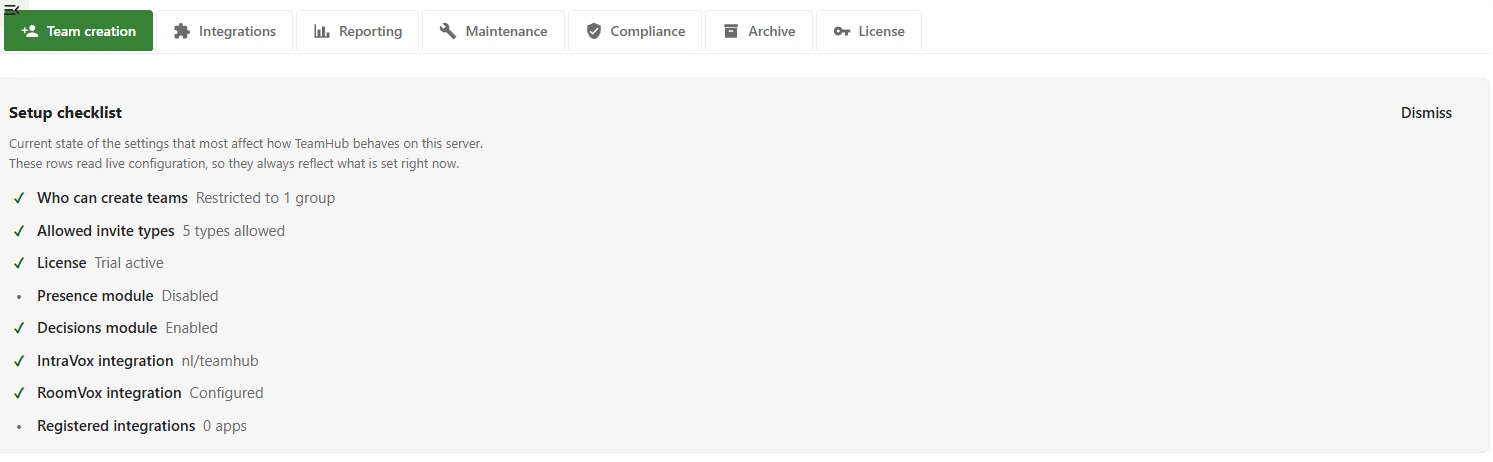
Getting a fresh install into a good state used to depend on knowing where to look. The admin settings now open with a Setup checklist covering the settings that most affect how TeamHub behaves on your server: who can create teams, which invite types are allowed, licence state, the Presence and Decisions modules, the IntraVox and RoomVox integrations, and any registered third-party apps.
The rows read live configuration rather than a stored "have you done this yet" flag, so the checklist always reflects what is set right now — which makes it just as useful six months in as a quick audit of the server's current posture. Dismiss it once you're settled.
Around it, three smaller things: the help ? in the sidebar footer is far easier to find, the create-team procedure has been reworked, and a number of in-app messages were rewritten to say what they actually mean.
A nudge towards the documentation
Community version onlyThere is a full documentation site behind the ? in the sidebar, and new users routinely never found it. A short Getting started callout now appears above the brand row and points straight at it.
It shows up on the landing page only — never once you have a team open, the create wizard running, or Browse Teams in front of you. Orientation belongs at the entry point, not over your shoulder while you work.
The X closes it for the rest of your browser session. To switch it off permanently, go to Settings → Personal → TeamHub → Getting started — it's a per-user preference, so one person turning it off doesn't hide it from everyone else. Like the help button it points at, the callout only ever renders on Community instances.
Documentation site refreshed
The docs had a pass alongside this release: pages brought up to date with 4.5.0, and a handful of statements corrected where they had drifted from what the app actually does. Same site the ? button opens — tldr.host/teamhub/docs.
Admin settings and Manage team tabs are easier to read
Several tabs on both sides were reworked for readability. Settings that used to sprawl across a section heading, a full-width paragraph, a control and a hint now sit on a single row — name and description left, control right — so a tab reads as a list of decisions instead of a wall of text.
Alongside that: font sizes aligned across the admin tabs so no tab reads heavier than its neighbours, empty states made consistent (a section that lost its last item no longer collapses to a lonely header), and a few labels renamed to describe what they actually do — Danger zone became Delete team, Wiki became Collective.
Leaving a team you also belong to another way
If you leave a team but you're also in it through an attached group or another team, you keep access — that's correct behaviour, and it used to be reported as a clean departure the sidebar then contradicted.
TeamHub now tells you: "You are no longer a direct member, but you still have access…". In Browse Teams the card flips to the indirect-member state — Open, with Leave disabled and a "via group" note — rather than reverting to Join and inviting you to rejoin something you never left.
"Milestone reached" now reports real progress
For Advanced projects, the automatic milestone post used to be a single line: this milestone was scheduled for today, confirm progress with the team. It now arrives with the progress already summarised.
Each post opens with a Since… line naming the previous milestone and its date (falling back to the project start date), then covers the window between the two:
- Deck tasks due in that period — total, completed, still open.
- Decisions raised in that period — proposed, decided, still awaiting — shown only when the Decisions module is on for the team.
Task ownership matches the Project Compass widget's Milestones pillar, so the post and the widget always agree on which cards belong to which milestone.
Compliance report: invite types, and a printable version
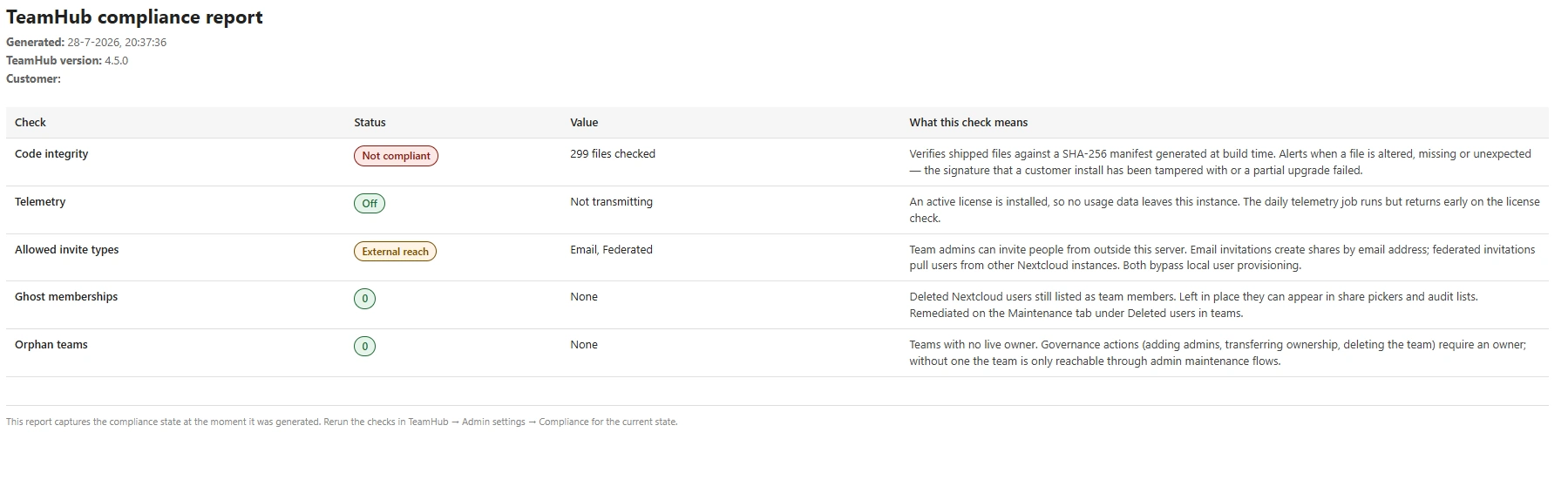
The compliance report gained an Allowed invite types check. It flags when team admins can reach beyond your server — email invitations create shares by e-mail address, federated invitations pull in users from other Nextcloud instances, and both bypass local user provisioning. Reads OK when they can't.
There's also a new button on Admin settings → Compliance that opens a print-optimised report in a new tab and hands it to your browser's Save-as-PDF dialog. Every check carries a plain-language explanation of what it means next to its status and value, plus the generation date, the TeamHub version, and your customer name when a licence is installed — so what reaches an auditor is a document rather than a screenshot.
The printable report is deliberately English-only: these tend to travel to auditors and regulators, and a mixed-language compliance document helps nobody.
Telemetry is being sent again
Community version onlyThe licence-derived telemetry policy was intact, but it had lost its transport — so reporting from unlicensed instances had quietly stopped. A daily background job restores it.
The policy itself is unchanged in both directions: instances with an active licence or trial never report, and neither do expired licences inside the 30-day grace window.
"Leave team" now actually removes you
Clicking Leave team removed your direct membership but left Nextcloud's Circles membership cache untouched — the table the sidebar and every share picker read from. The team stayed put with full access, and because your direct level was now zero, the Leave action disappeared from the 3-dot menu, leaving no way to retry.
The cache is now rebuilt when you leave, exactly as it always has been when an admin removes a member.
Dropping Nextcloud 32 support
Planned — 1st September releaseWe support the two latest versions of Nextcloud. You can still run TeamHub on Nextcloud 32 with the last release before the 1st September release, but those builds will be out of development support after that. Plan your upgrade(s) accordingly.
Dropping group folder support
Planned — 1st October releaseNextcloud Teams is going to make Team folders the files option going forward. We already support Team folders as well as Teams' default shared folder — if you still use shared folders, we encourage you to migrate to Team folders.
Tip — You can add a Team folder next to the shared folder under Manage team → Integrations → Team apps → Files. Then move the files from the shared folder into the new Team folder and disconnect the shared folder.
MCP support
ResearchMCP (the Model Context Protocol) is an open standard that lets AI assistants talk to external tools and data sources through a common interface — think of it as a universal adapter between models like Claude or ChatGPT and the apps you actually use.
For TeamHub that would mean your team's messages, decisions, presence, projects, and files become first-class context an AI assistant can read and act on — safely, with the same roles and permissions the team already has. We're exploring what a first useful surface looks like.
ServiceHub
ResearchStarted research on ServiceHub as a team option for support teams. The idea is a lightweight in-app choice for triaging and answering issues, with optional forwarding to dedicated support tools when a team already has one in place.
Items marked Research are exploratory — they may or may not make it to production. If you have thoughts on any of them, we'd love to hear from you: share your feedback.