Release notes for version 4.6.11
A short release with one big addition: teams no longer have to be created one at a time. Plus four fixes you reported — files in the Files tab, collectives on teams with a space in the name, underscores in team names, and Collectives called by its own name.
Upgrading from 4.6.0: one database migration runs on update, adding two tables that hold import runs. Nothing else is required, and no existing team is touched.
Bulk import: bring your teams in from a CSV file
Moving to TeamHub used to mean opening the New Team wizard once per team. If you were arriving from Microsoft Teams, Slack, or a spreadsheet somebody has been maintaining for three years, that was the whole first week.
Admin settings → TeamHub → Import/Export now takes a CSV file and creates the lot. One row per team, up to 500 teams and 2 MB per file. Every team is set up exactly as the wizard would set it up: the apps, privacy settings and modules all follow the template you name in the row, so an imported team and a hand-made one are the same thing.
It also does something the wizard cannot: each team gets the owner and the team admins you name. The wizard always makes the creator the owner, which is why importing 200 teams by hand left one admin sitting in 200 teams. Here the importing admin is removed from each team afterwards, unless the row names them.
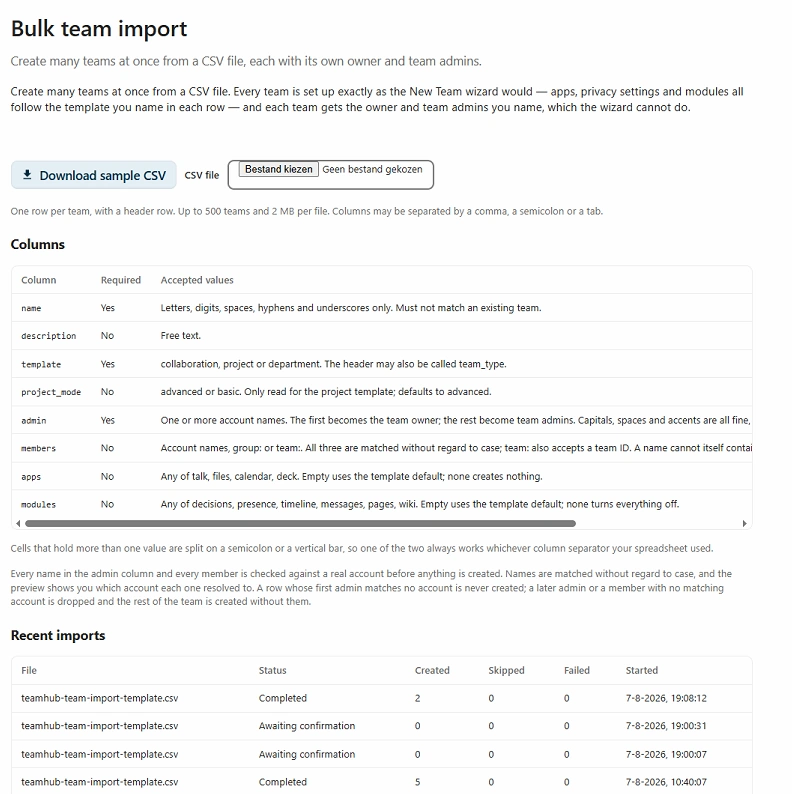
Admin settings → TeamHub → Import/Export. The full column reference sits above the upload, so you can write the file without leaving the page — and Recent imports keeps every run you have made.
How an import runs
- Download the sample CSV from the tab. It is generated by the same code that parses your upload, so it cannot drift out of date.
- Upload your file. TeamHub checks the whole thing before creating anything, and every account name, group and sub-team is resolved against a real account first.
- Read the preview. A grid of every row with the owner, the team admins and the members it resolved to, and a plain-language reason on every row that will be skipped or will fail.
- Confirm. Teams are created with a progress bar and a live count. When it finishes you can download the results as CSV, one line per row with its outcome.
The run is stored on the server the moment you upload, so it survives a closed tab: whatever is left is finished in the background within a few minutes. You can stop a run part-way, and the teams already created are kept.
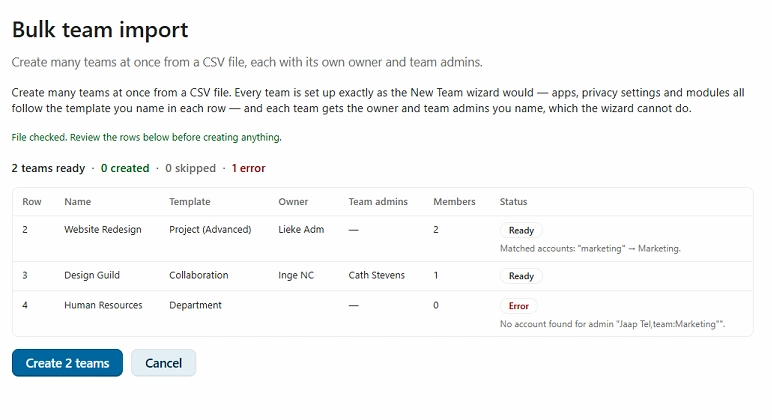
Before anything exists. Two rows ready, one refused — with the reason on the row itself and the resolved account names spelled out, so you fix the spreadsheet rather than the teams.
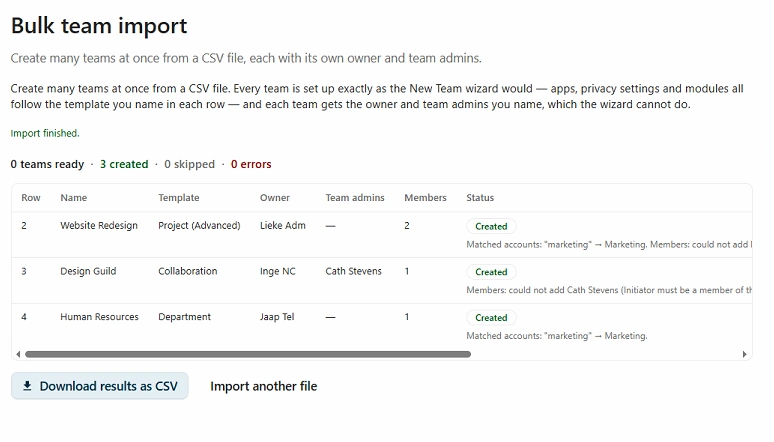
After confirming. Every row keeps its outcome and any warning it collected, and the whole run comes back out as a CSV.
The columns
| Column | Required | Accepted values |
|---|---|---|
| name | Yes | Letters, digits, spaces, hyphens and underscores. Must not match an existing team. |
| description | No | Free text. |
| template | Yes | collaboration, project or department. The header may also be called team_type. |
| project_mode | No | advanced or basic. Only read for the project template; defaults to advanced. |
| admin | Yes | One or more account names. The first becomes the team owner, the rest become team admins. |
| members | No | Account names, group:<group name> or team:<team name>. |
| apps | No | Any of talk, files, calendar, deck. Empty uses the template default; none creates nothing. |
| modules | No | Any of decisions, presence, timeline, messages, pages, wiki. Empty uses the template default; none turns everything off. |
Things worth knowing before you write the file
- Your spreadsheet's separator is fine. Columns may be separated by a comma, a semicolon or a tab — Dutch and German Excel write semicolons, and that works. Cells holding more than one value split on a semicolon or a vertical bar, so one of the two always works whichever separator you used.
- Names are matched without regard to case, and the preview tells you which account each one resolved to. Capitals, spaces and accents are all fine:
Renée Muñozis a perfectly good cell. - A bad name in the owner position fails the row rather than quietly handing the team to whoever was listed second. A later admin or a member with no matching account is dropped with a warning, and the team is still created.
- Sub-teams by name.
team:Marketingresolves by display name, and still accepts a team ID. Two teams sharing a display name is refused rather than guessed, with a message pointing at the ID. - Advanced projects need a licence or trial, exactly as in the wizard. Without one the row is created as a basic project and says so, rather than failing.
- Bulk creation obeys the team-creation policy you have configured in admin settings, including the allowed invite types.
Tip: a run you have already confirmed shows up under Recent imports with its created, skipped and failed counts, so you can go back for the results CSV later. Runs are pruned automatically 30 days after they finish.
No changes in this release — everything else here is a fix against a reported issue.
The Files tab loads the team folder again
On some installs the Files tab showed "This content is blocked. Contact the site owner to fix the issue", while the very same URL opened fine in a new browser tab.
The tab was asking for a URL the server answers with a redirect, and Chromium blocks the redirected document inside a frame even when every security header allows it. The tab now asks for the address the server actually serves, so there is no redirect to block. Nothing to configure — it works after the update. The Talk tab carried the same flaw on a rarely-reached fallback path and was fixed alongside it.
Fixes issue #74.
Teams with a space in the name open their collective
A team called Design lab could not reach its connected collective, while Designlab was fine. The link TeamHub built left out part of the address Collectives expects; for a one-word name the shortened form happened to still match, which is why this only ever showed up on names with a space in them.
The link is now built the way Collectives addresses its own pages, so it lands on the right collective whatever the team is called. This closes the remainder of issue #71, which was partially fixed in 4.6.0.
Underscores are allowed in team names
Team names accepted letters, digits, spaces and hyphens, and rejected the underscore along with everything else. That was stricter than it needed to be: an underscore is legal in a filename on Windows, macOS and Linux alike, harmless in a web address, and fine as a Deck board or Talk room title.
New team names may now contain letters, digits, spaces, hyphens and underscores. The rule moved in all three places that enforce it — the server, the create-team wizard and the quick-create guard — so they cannot disagree with each other, and the CSV importer inherits it.
Fixes issue #73.
Collectives is called Collectives everywhere
The tab said Wiki, the Manage Team toggle said Collective, and the Nextcloud app it all runs on is called Collectives — so the same feature answered to three names depending on where you were standing.
It is Collectives throughout now: the tab bar, "Create Collectives page" on desktop, tablet and mobile, the enable and disable messages, the confirmation dialog, the Manage Team toggle and the create-team wizard card. 22 strings across seven languages moved together. Where the text needs a singular everyday word it says the collective — the app is Collectives, the thing your team has is a collective.
Note for CSV authors: the stored key is still wiki, in the importer's modules column and in the admin column reference. Renaming it would have invalidated import files people have already written, so it stayed.
Fixes issue #75.
Dropping Nextcloud 32 support
Planned: 1st September releaseWe support the two latest versions of Nextcloud. You can still run TeamHub on Nextcloud 32 with the last release before the 1st September release, but those builds will be out of development support after that. Plan your upgrade(s) accordingly.
Dropping group folder support
Planned: 1st October releaseNextcloud Teams is going to make Team folders the files option going forward. We already support Team folders as well as Teams' default shared folder if you still use shared folders, we encourage you to migrate to Team folders.
Tip: You can add a Team folder next to the shared folder under Manage team → Integrations → Team apps → Files. Then move the files from the shared folder into the new Team folder and disconnect the shared folder.
MCP support
ResearchMCP (the Model Context Protocol) is an open standard that lets AI assistants talk to external tools and data sources through a common interface. Think of it as a universal adapter between models like Claude or ChatGPT and the apps you actually use.
For TeamHub that would mean your team's messages, decisions, presence, projects, and files become first-class context an AI assistant can read and act on safely, with the same roles and permissions the team already has. We're exploring what a first useful surface looks like.
ServiceHub
ResearchStarted research on ServiceHub as a team option for support teams. The idea is a lightweight in-app choice for triaging and answering issues, with optional forwarding to dedicated support tools when a team already has one in place.
Items marked Research are exploratory, they may or may not make it to production. If you have thoughts on any of them, we'd love to hear from you: share your feedback.