Release notes for version 4.7.0
Two new features — teams you can copy between servers, and teams that know when they end. Plus a calendar view of our own that keeps team calendars off the internet, ownership transfers that carry the team's resources across, and four fixes you reported.
Upgrading from 4.6.x: a normal update with no manual steps. On first run TeamHub revokes the public share on every team calendar it previously published — see Our own calendar view below. If any share cannot be revoked it is reported in the Nextcloud log with a count, so you can deal with those few by hand.
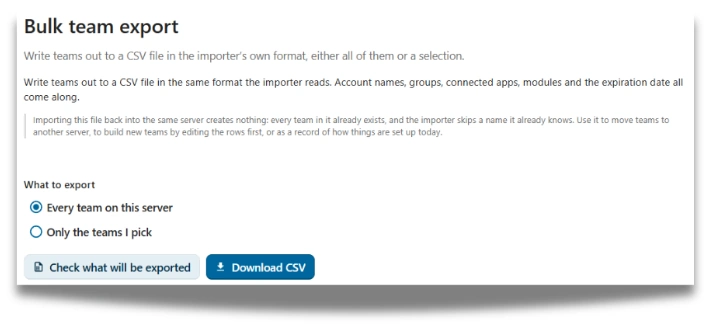
Bulk export: copy teams from one instance to another
Since 4.6.11 you have been able to bulk import teams from a CSV file. You can now bulk export them, which turns a one-way door into a round trip.
Export a set of teams from one instance and import them into another. Build and rehearse a team structure on a development server, get it right, then move it to production — or pull production teams down to a test server to reproduce something without touching live data. The export sits next to the import it feeds, under Admin settings → TeamHub → Import/Export.
Because the two halves share a format, an exported file is an importable file: what comes out of one instance goes into the next without an editing step in between.
Licensing: bulk export is a licensed feature and needs an active or trial licence. Bulk import stays open to everyone — whatever happens to your licence, you must always be able to get your data in. The gate is on the side that is a convenience, not the side that would be a lock-in.
Expiration dates: teams that know when they end
Not every team is forever. A project, a task force, an external collaboration — each has an end, and until now nothing in TeamHub knew that. So teams accumulated: nobody deletes a team in case somebody still needs it, and a year later nobody can tell which ones are live.
You can now set an expiration date on a team, either in the create wizard when you set the team up or later from Manage team → Maintenance.
And because "we need two more weeks" is the most predictable thing about any deadline, there is a workflow for it rather than a support ticket. A team owner requests a new date and says why; a Nextcloud administrator approves it, denies it, or grants a shorter extension than the one asked for. Both sides see the decision, who made it, and the reasoning on each side — the team's original reason and the administrator's note read as two separate things, because they are.
Note: teams created from the Department template do not expire. A department is not a project, and dating one would only produce a renewal nobody meant to think about.
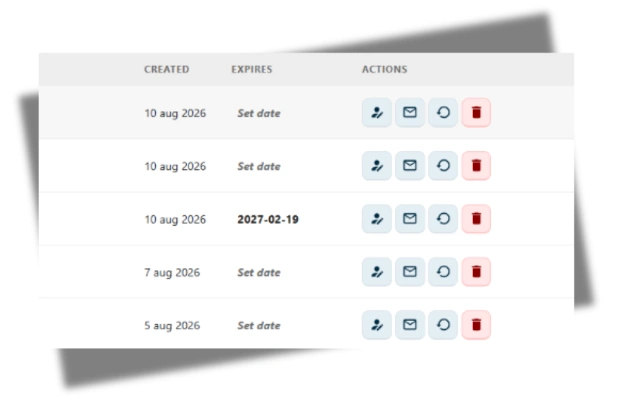 Manage TeamHub → Maintenance tab, showing the expiration date row.
Our own calendar view — so team calendars stay on your server
Showing a single team calendar inside TeamHub meant embedding Nextcloud's calendar app, and the only way to embed one calendar was to publish it behind a public share link. That link needs no login. It was the mechanism that made the tab work, and it was a great deal of exposure for a convenience.
So we stopped embedding. TeamHub now queries the calendar items itself and draws the grid in the app. Nothing is published, nothing is reachable from outside your instance, and the tab looks and behaves the way it did before.
The shares that already exist are revoked for you. On update, TeamHub removes the public share from every team calendar it created. If any cannot be revoked, the count and the details go to the Nextcloud log so you can finish those by hand — they would otherwise stay publicly readable, which is the one case worth checking after you update.
A copied team link behaves the way the team does
Copying a team link and sending it to someone is the obvious way to invite them. What happened when they opened it did not depend on how the team was set up — so the link either offered too much or explained too little.
One link now gives three honest answers, matching the team's own access setting:
| Team access | What the person opening the link gets |
|---|---|
| Open to anyone | An option to join the team, there and then. |
| Moderator approval | A Request to join button. A moderator decides, as they should. |
| Closed | A plain message that this team is invite-only — rather than being left at a door that will not open. |
Closes issue #78.
Ownership transfers take the team's resources with them
Handing a team to a new owner changed the team, and left everything the team actually works in behind — still owned by someone who had moved on, or left the organisation entirely.
A transfer now carries the team's resources across with it. The Deck board and the calendar change owner, and moderator rights on the Talk conversation move to the new owner. The team and the things the team works in no longer drift apart.
The principle underneath: after a transfer, access comes from team membership rather than from a personal grant left behind. Someone still in the team keeps what the team gives them; someone who has left keeps nothing.
Dates read in your own locale and timezone
Dates rendered against the server's locale and the UTC day rather than the reader's, so a date could show in the wrong format — and, near midnight, on the wrong day. A meeting created late in the evening could land on tomorrow, and "today" meant the UTC today rather than yours.
Dates and times now follow the reader throughout the app.
Fixes issue #79.
Duplicate team names are refused
Both the create-team wizard and the CSV importer would happily create a second team with a name already in use, leaving two entries you could not tell apart from the outside.
Both now refuse the duplicate and say so — the importer on the row, in the dry-run preview, before anything is created.
Fixes issue #80.
Team names accept far more than they used to
Team-name validation had grown by accretion, each rule added for a reason that made sense at the time, and together they turned away plenty of names that were never a problem — punctuation, and the characters that ordinary names in most languages are made of.
The rule is now built the other way round: instead of allowing a short list of characters, it blocks only what genuinely needs blocking, up to a generous length limit. Most names that used to be refused are simply accepted now.
Fixes issue #81.
Teams sort in the order you expect
The team list came back in an order that did not match what the sort said it was doing, which is worst on exactly the installs where it matters most — the ones with enough teams that you rely on the order to find one.
Sorting is correct again.
Fixes issue #82.
Dropping Nextcloud 32 support
Planned: 1st September releaseWe support the two latest versions of Nextcloud. You can still run TeamHub on Nextcloud 32 with the last release before the 1st September release, but those builds will be out of development support after that. Plan your upgrade(s) accordingly.
Dropping group folder support
Planned: 1st October releaseNextcloud Teams is going to make Team folders the files option going forward. We already support Team folders as well as Teams' default shared folder if you still use shared folders, we encourage you to migrate to Team folders.
Tip: You can add a Team folder next to the shared folder under Manage team → Integrations → Team apps → Files. Then move the files from the shared folder into the new Team folder and disconnect the shared folder.
MCP support
ResearchMCP (the Model Context Protocol) is an open standard that lets AI assistants talk to external tools and data sources through a common interface. Think of it as a universal adapter between models like Claude or ChatGPT and the apps you actually use.
For TeamHub that would mean your team's messages, decisions, presence, projects, and files become first-class context an AI assistant can read and act on safely, with the same roles and permissions the team already has. We're exploring what a first useful surface looks like.
ServiceHub
ResearchStarted research on ServiceHub as a team option for support teams. The idea is a lightweight in-app choice for triaging and answering issues, with optional forwarding to dedicated support tools when a team already has one in place.
Items marked Research are exploratory, they may or may not make it to production. If you have thoughts on any of them, we'd love to hear from you: share your feedback.