Release notes for version 4.8.0
One new feature — a sidebar you arrange yourself, with your teams bucketed into groups of your own making. Plus a Compliance tab that maps ISO/IEC 27001:2022 and names its own gaps, Nextcloud tags on teams and six fixes you reported.
Upgrading from 4.7.x: a normal update — no database migration and no schema change. One thing to check. The minimum Nextcloud version is now 33. If you are still on 32 you need to update Nextcloud before you can install this version.
Team groups: a sidebar you arrange yourself
On a large instance you can belong to dozens of teams, and a flat list stops being navigable well before that. You can now bucket your teams into named, collapsible groups — as many as you need. A Favorites group is supplied to start you off.
Both actions live in the team's action menu in the left sidebar. Move to group… opens a small dialog with every group you have; the New group field beside it creates one and puts the team in it, so a group can start from the team that needed it rather than from an empty container.
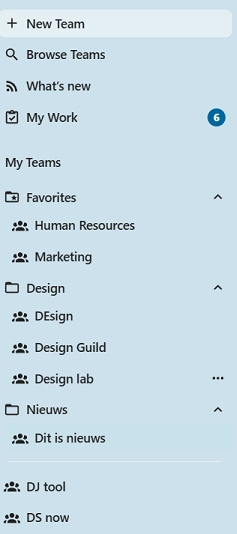
Your teams, your buckets. Favorites carries a starred folder, your own groups a plain one — and the teams you have not placed stay loose at the bottom, exactly where they were.
The grouping is yours alone
A group is a personal view of your sidebar. Nobody else sees it, it allows you to create order on the list of teams you are a member off.
Any team not in a group will appear in a list format like before.
Deleting a group brings the teams that belong to the group back to the non-grouped list of teams
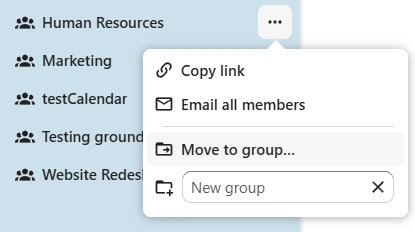
One menu, two ways in. Move to group… for the groups you have; the New group field for the one you have just decided you want.
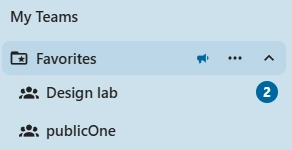
Collapsing is not hiding. A group holding a team with unread updates carries a megaphone beside its name — and it is real text underneath, so a screen reader says so too.
The small print
- Collapse state is remembered. Each group's own menu carries an Expanded by default checkbox, so the groups you live in are open when the app loads and the rest are not.
- Your groups can be renamed and deleted from the group's menu. Favorites cannot be — it is the one group the app owns, and deleting it would leave the feature with no visible way in.
- Favorites reads in your language. Its name is translated rather than stored, so it does not stay in whatever language you happened to be running the day it was first saved. Your own group names are your own words and are stored as you typed them.
- Joining or leaving a team needs no filing. Only teams you have actually placed are recorded, so a new team simply arrives loose, and a team you leave takes nothing with it.
Teams can carry Nextcloud tags - (Research)
A team admin can now classify a team from Manage team → Tags. The chips show up there, on the Browse teams cards, and under the team name in the admin All teams grid — so “which teams hold sensitive work” becomes something you can see rather than something you have to ask.
TeamHub creates no tags of its own. The vocabulary is Nextcloud's, managed under Settings → Administration → Basic settings, so one tag list covers your files and your teams instead of two lists that drift apart. There is also no new table and no migration: a tag on a team is stored where a tag on a file is stored.
Three things follow from that, all of which are the point rather than side effects:
- A team's tags are sent only to its members. Browsing teams you are not in shows those teams without their tags — a classification on a team you cannot open still tells you something about it.
- Adding and removing a tag are audited, which is what makes a classification evidence rather than decoration.
- Compliance, We research if we can use tags as senstivity labels for teams. Restricting certain things that are changeable by team admins after team creation.
The Compliance tab maps ISO/IEC 27001:2022, including where it cannot
Every check in the Compliance tab now declares which ISO/IEC 27001:2022 control it evidences. The control ids appear in each row's info menu, and in a new column in the printable report.
The report gains a second table listing all eleven controls in scope with the checks behind each including A.5.9 and A.5.10, marked “Not evidenced”
Two new rows come with it:
- Team classification: how much of the instance is tagged. Red when no team is, amber for partial coverage, green when all are, and grey on an instance with no teams at all.
- Audit log retention: the retention window, and the fact that the audit service exposes only append and bulk purge, so a record cannot be rewritten before it expires.
Nextcloud 32 support has ended
As announced in the 4.7.0 roadmap, this is the release that drops it. TeamHub supports the two latest Nextcloud versions, so the supported range is now 33 – 34.
Dates are written in your format, not the interface's language
Nextcloud keeps two settings that people usually assume are one: the interface language, and the date and number format. They diverge constantly an English interface with Dutch dates is the ordinary European setup — and TeamHub was reading the language when it should have been reading the format. So a reader who had set their format quite deliberately got dates written someone else's way.
Dates now follow the format setting throughout the app, and the time zone comes from your Nextcloud timezone preference rather than from whatever machine you happen to be sitting at.
Fixes issue #79.
Enough colours to tell your resources apart
Team Deck boards and calendars are colour-coded, and the palette was twelve colours drawn at random. Twelve is not many, and random is worse than it sounds: by about twenty teams you had roughly ten distinct colours and several exact repeats, which is precisely when the colour stops doing its job.
The palette is now twenty-four colours, and a new resource takes the one your team is using least rather than one picked by chance. Existing teams keep the colour they have, the original twelve are unchanged and still first in the list.
Fixes issue #84.
The formatting toolbar, including numbered lists
There is a numbered-list button now, beside the bullet one. Blank lines inside a selection are left unnumbered, because in Markdown that is what separates one list from the next.
Two long-standing annoyances went with it. The buttons insert the syntax and nothing else pressing Bold on an empty composer used to write **bold text**, which every single use began by deleting; it now leaves the caret between the markers. And a list made from several selected lines marks every line, rather than the first one only.
Underneath, the composer, the comment box and message edit mode had three separate copies of this toolbar which had drifted apart, so the same button behaved differently depending on where you pressed it. They are one implementation now which is also how bold, italic, code, heading and link finally came to honour a selection while editing a message.
Fixes issue #85.
Membership through a group reaches the conversation and the board
Add a Nextcloud group to a team and its people are team members, but they could arrive to find the Talk conversation missing and the Deck board out of reach.
Most of a team's resources work out who belongs at the moment you open them, so they were right all along. Talk is the exception: it stores one row per attendee, and a person with no row is told the conversation does not exist. Those rows were not being written for people who reached the team through a group.
Every membership change: invite, remove, leave, and the admin maintenance path now runs a single reconcile after the group has been flattened into the team's membership, so it acts on who is actually in the team rather than on a stale answer. The hourly reconcile job stays as a backstop, and a resource that cannot be synced no longer fails the membership change that triggered it.
The same issue covered a second symptom: promoting someone who is in the team through a group to Moderator or Admin failed. That works now too.
Fixes issue #87.
You decide who can moderate the team's posts
Manage team → Messages → Minimum role to manage posts now sets one floor for moderating the stream: who may pin a message, and who may edit or delete a message or comment written by somebody else. It defaults to admin, and an owner or admin can lower it to moderator where the team wants shared upkeep rather than a bottleneck.
Two guarantees sit under it. Authors can always edit and delete their own, whatever the floor is set to. And an edit is never silent: the post carries a line saying it was changed and by whom, and edits and deletions reach the team's audit stream because a moderator quietly rewriting somebody else's words is the thing worth being able to look up afterwards.
Fixes issue #88.
A teamhub hook on every embedded page
When TeamHub embeds a Nextcloud app Files, Deck, Calendar etc. it is the same app you would open on its own, and an administrator had no way to style it differently in here than out there.
Every page TeamHub frames now carries class="teamhub" on its <html> element, which your Theming custom CSS can key on:
html.teamhub .app-files .some-toolbar { display: none }
Nextcloud already marks the content element with the app's own id, so the two compose: you can target one app, inside TeamHub, and nothing else. The rule holds without exception pages TeamHub serves itself carry the class in their markup, and embedded ones have it re-applied if the app rewrites the element. Treat the name as a public contract: it is what your instance's CSS depends on, so we will not rename it.
Fixes issue #90.
Dropping Nextcloud 32 support
Shipped in 4.8.0Done, as planned for the 1st September release. The supported range is now 33 – 34 — see Nextcloud 32 support has ended above.
Dropping group folder support
Planned: 1st October releaseNextcloud Teams is going to make Team folders the files option going forward. We already support Team folders as well as Teams' default shared folder if you still use shared folders, we encourage you to migrate to Team folders.
Tip: You can add a Team folder next to the shared folder under Manage team → Integrations → Team apps → Files. Then move the files from the shared folder into the new Team folder and disconnect the shared folder.
Team tags
Active researchStarted research on using team tags as a way to create profiles and change the level of freedom team owner/admins have over their teams.
MCP support
ResearchMCP (the Model Context Protocol) is an open standard that lets AI assistants talk to external tools and data sources through a common interface. Think of it as a universal adapter between models like Claude or ChatGPT and the apps you actually use.
For TeamHub that would mean your team's messages, decisions, presence, projects, and files become first-class context an AI assistant can read and act on safely, with the same roles and permissions the team already has. We're exploring what a first useful surface looks like.
ServiceHub
ResearchServiceHub as a team option for support teams. The idea is a lightweight in-app choice for triaging and answering issues, with optional forwarding to dedicated support tools when a team already has one in place.
Items marked Research are exploratory, they may or may not make it to production. If you have thoughts on any of them, we'd love to hear from you: share your feedback.