Release notes for version 4.9.0
Two new features: a Policy tab where templates and profiles together become the standard your teams are deployed to, with Maintenance and Compliance reporting which teams still match it; and file reviews, where you ask teammates to review a document from the Files app and the whole workflow runs in My Work. Plus creating many teams in one pass, rolling a profile out to teams that already exist, handing ownership to somebody who joined through a group, comment notifications, and three issues you reported.
Upgrading from 4.8.x: five migrations run, all additive. Eight new tables, one new column, one column dropped and two retired settings deleted. Nothing else is touched.
The supported Nextcloud range is unchanged at 33–34.
No existing team is changed by the upgrade: templates and profiles ship seeded but unassigned, so no team is classified, no team's settings are written, and nothing is compared until an administrator applies something. What does change on day one is the create-team wizard. See Templates and profiles below.
Templates and profiles: one standard for deploying teams
A new Admin → TeamHub → Policy tab holds two halves of one idea. A template decides what a new team is made of. A profile decides what its settings are set to. Put together they are a standard: a team of a given kind arrives with the same apps and the same posture every time, without the person creating it having to know what that posture is.
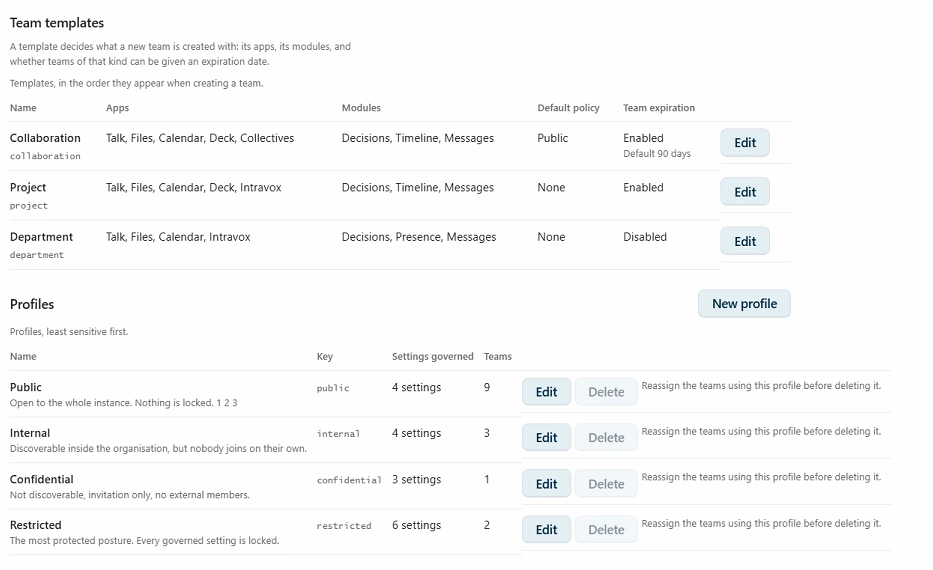
Two tables, one standard. Templates say what a team is built from; profiles say how it is set. The Teams column is the number that matters — a profile no team carries governs nothing.
What each decides
A template carries the apps and modules a new team is provisioned with, whether teams of that kind can be given an expiration date and the default period for it, and the default profile that preselects in the wizard. Three ship seeded: Collaboration, Project and Department. All three are editable rows rather than fixed code.
A profile governs ten team settings. Each one set to Team decides, Always on or Always off. We shipped four profiles, least sensitive first: Public, Internal, Confidential and Restricted.
Team decides is not the same as Always off, which is why there are three states rather than a checkbox. Anyone can join, Members can invite others and their neighbours are hardening bits where a profile may genuinely need to say “this kind of team must require approval to join”, not merely “must not be open”.
The create-team wizard is two steps now
This is the part you will notice first. The wizard is Details and Members; the Settings step and the Apps step are gone, because those answers now belong to the profile and the template. Every creator picks a policy, not only administrators, and the team that comes out complies with its template and its profile.
What that removes with it, stated plainly: the new-versus-existing resource chooser, per-resource custom names, and the module toggles. Connecting an existing Deck board or calendar now happens from Manage team → Modules & integrations. Which is where a team that already existed always had to do it anyway.
Reclassifying a team afterwards stays a Nextcloud administrator action. A team admin who could reclassify their own team could lift every restriction placed on it, which is precisely the bypass this design exists to close.
Maintenance and Compliance say who still matches
Defining a standard is worth nothing if you cannot see who is holding to it, so both admin surfaces learned to report it.
- Maintenance → All teams shows every team's template and profile as chips under its name. The profile chip is green while the team's settings still match the profile and red once they no longer do and a red chip is a button. Clicking it opens one row per setting that differs, with what the profile defines beside what the team actually has.
- The Compliance tab has a Team profiles row, comparing every classified team against the profile it carries. The pill counts drifted teams, matching every other row on that tab where the number is always the thing that needs attention.
- The template chip is never coloured, and that is honesty rather than an omission. A template decides what a team is made of and mostly leaves nothing behind to compare against afterwards. Colouring it would assert a check that does not exist.
The compliance pill has a fourth state. On an instance where no team carries a profile it reads No teams classified — never a green zero. A drift count of zero on an estate that has classified nothing is the most dangerous sentence this feature could print: it reads as “no deviations” to exactly the person who would act on it.
With this, the printable compliance report answers ISO/IEC 27001:2022 A.5.12 and A.5.13 again. Both have read not evidenced since 4.8.0's team tags were withdrawn together with A.8.16, because the answer is produced by monitoring rather than by prevention.
Enforced and Reported are different words on purpose
Every governed setting carries one of two tags, and the interface always shows which:
- Enforced: Only TeamHub can write it, so a governed value is genuinely refused. A team admin whose profile governs public messages sees the switch greyed out with the classification named, and the API answers 403 to a differing value, with an audit row behind it.
- Reported: Something outside TeamHub can also write it. The six Circles privacy bits, external members and the integration list are all in this group: Contacts and the Teams app write
circles_circledirectly, and Nextcloud gives no app a way to stop another one doing so.
Ask your teammates to review a file
A new Request review entry in a file's … menu in the Files app. Pick one teammate, several, or everybody in the team; add an optional message and a due date. Each reviewer is notified, the request is posted into the file's own chat, and the whole workflow for them and for you runs in “My Work“.
Create multiple teams at once
Now that a template and a policy decide what a team is made of, creating forty of them is filling in a table rather than answering forty wizards. “+ New team“ has a multiple teams tab: one row per team, with name, template, policy, owner, team admins, members and expiry. Press Create teams and it validates and starts in one go, with live progress and a per-row result.
Owner and Team admins are separate columns. One “Administrator” field where the first name silently becomes the owner and the rest become admins is a rule you have to be told rather than one you can see.
Accounts resolve as you type. Each people column is a search-and-pick cell with chips, so you cannot select an account that does not exist. Anything only the server can know: a name already taken, a date the template refuses comes back annotated on the row that caused it, rather than on a separate screen where you have to count rows to find yours. Rows left without a name are ignored, so spare rows can simply stay empty.
Licensed, and open to the team-creator group or to Nextcloud administrators where no such group is configured. That is deliberately stricter than ordinary team creation, which permits everyone when no group is set. The right default for making one team is the wrong one for making forty.
The CSV importer changed to match. The apps and modules columns are gone, because what a team is provisioned with is the template's answer and what it may have is the policy's. A file written for an earlier version still imports; a row that put a value in either column gets a warning saying it was ignored. The export now writes the policy column. Without it a round trip quietly reclassified, sending a team deliberately moved to Confidential back on its template's default.
Push a policy to a team that already exists
Profiles that only ever applied to teams created after the feature shipped would miss every team you already have, which is most of the value. Admin → TeamHub → Maintenance → All teams now carries a shield button on each row: pick a profile, read the field-by-field diff: Visible to everyone: On → Off and apply.
The preview is not skippable. The Apply button stays disabled until the diff is on screen. A silent bulk change to somebody's teams is not acceptable even when it is correct.
Removing a profile writes no team setting. The team keeps every value it has and simply stops being compared. Reverting on declassification would be a second silent state change, and reverting to what has no answer: the values before the profile was applied are recorded nowhere, and the team may well have been created under it.
Saving a profile or a template offers the same rollout. When the change would affect teams that carry it, the save returns a plan naming every one of them, split into those that still match what the definition said before and those that have already drifted. You can apply to the compliant ones, force it to all of them, or not now and then a report says per team what happened, with the ones needing a human sorted first.
Two limits worth knowing before you use it. The team folder is the one thing a rollout will not delete: dropping files from a template would otherwise destroy the documents of every team of that kind from one form submission, so those teams are listed in the report for you to handle from Manage team, where the consequence is stated per team. Everything else like Talk, Calendar, Deck, Intravox and Collectives really is removed.
Every apply is audited per team, with the per-field before and after as metadata. The evidence that the rollout happened, and unlike drift found by a scan, it has a real actor.
Ownership can be handed to somebody who joined through a group
On a team whose members all arrive through an attached Nextcloud group, Manage team → Transfer ownership matched nobody. It searched only the team's direct members, so it issued no request at all — an empty result that reads like a broken control rather than an empty list.
The picker now searches direct and inherited members together, deduplicated so somebody holding both routes is offered once with their real role, and an inherited candidate is labelled via <group> so you know before choosing that this person arrives through a group. The server-side check moved with it, from direct member rows to the effective membership that credits a group.
The boundary being defended is member versus outsider, and somebody in the team through a group is on the member side of it. Genuine outsiders are still refused, and the transfer writes the direct member row as part of the same call, so there is no separate promotion step to know about.
Owner deliberately stays out of the Members tab's role picker. That is a long list where a mis-click is an accident; this control sits behind a search, an explicit selection and a confirmation dialog.
Notifications for messages and comments
A bell button in each message header turns notifications on and off for that thread, delivered through the ordinary Nextcloud bell. The author of a message is subscribed by default and can unsubscribe like anyone else; everybody else starts off and can subscribe to any thread they can read. One notification per comment, linking straight to the thread rather than to the team's home page.
Neither default is stored. Only explicit choices are recorded, and “subscribed” is derived as your choice, or else: are you the author. That is what makes the rule true for every message that already existed, with no backfill and no rows written on upgrade.
Two things came with it. Public message's comments are now readable by everyone, not only by the team that posted it. Publishing a message publishes the discussion under it, and until now a reader outside the team saw a card that ended at the body with no sign there was a thread at all. Writing is unchanged: commenting still requires membership, and the composer stays hidden rather than offering a box the server would refuse. And a deep link to a message now actually opens it — clicking one in “What's new” used to switch to the team's stream without ever loading the page holding that message.
Subscriptions end with membership, and membership is re-checked again when a notification is sent rather than trusted from the stored row. The two are not redundant: the second is what holds when membership ends by a route that runs none of the removal paths, such as a change to a Nextcloud group.
Implements issue #95.
Set who owns and who administers a team while you create it
Provisioning a team for somebody else used to mean creating it, then finding the members screen, then promoting people one at a time — and ending up sitting in every team you had ever set up.
The wizard's Members step now gives each person or group a role as you add them: Member, Moderator or Team admin. Team owner is one of the choices, and picking it hands the team over as the very last step of creation. Groups can carry a level too, but not ownership. A group cannot act, so it cannot own and the reason is stated rather than left to be guessed.
The creator leaves the team when they hand it over, unless they added themselves to the member list. Somebody provisioning teams to a company policy is not a member of the teams they set up, and the previous behaviour: demoting the creator to moderator meant an administrator accumulated membership of everything they had ever created. Adding yourself to the list is how you stay.
Two consequences are shown rather than assumed. The success screen stops offering actions that would fail: once you have left, Open team, Invite people and Review team apps all need membership you no longer have, so they are replaced by a single Done and a line saying the new owner can take it from here. And a failed handover is reported, never fatal. The team exists and works, and the screen says ownership could not be transferred and that you are still the owner, rather than claiming a transfer that did not happen.
Closes issue #96.
A page list for Collectives inside a team
In Collectives, the app's left-hand navigation is the page tree — and embedding an app in a team tab strips that navigation. So the Wiki tab showed you one page with no way to reach any other one.
TeamHub now draws the page list itself, beside the embedded view: the collective at the top, its page tree beneath, each row expandable, with a filter box for finding a page by name and a refresh button. Clicking a row does not reload the app. The embedded view routes to that page in place, so following the tree costs nothing.
Two details that matter in use. The ordering is Collectives' own, parentage and page order read from the app rather than re-sorted by us, so the tree matches what you see in the standalone app. And landing on a page the list has never heard of refetches it once, which covers the ordinary case of creating a page inside the embedded view and expecting to find it in the list.
Fixes issue #93.
The timeline loads on instances without pretty URLs
On a Nextcloud that needs /index.php in its app routes, the timeline failed with an HTTP 400 complaining about invalid timestamps — while the timestamps were perfectly valid.
The page was assembling its own API URL from the web root, which never carries /index.php. So the request bypassed the front controller and never reached the app at all; the 400 came from somewhere else entirely, which is why the error message pointed nowhere near the cause. The URL now comes from Nextcloud's own router, which inserts /index.php exactly when the installation needs it.
The links out of the timeline into Deck, Calendar and the rest needed the same treatment, and got it — also from a generated route, so the router stays the only thing deciding whether /index.php belongs in a URL.
Fixes issue #91.
Dropping group folder support
Planned: 1st October releaseNextcloud Teams is going to make Team folders the files option going forward. We already support Team folders as well as Teams' default shared folder — if you still use shared folders, we encourage you to migrate to Team folders.
Tip: You can add a Team folder next to the shared folder under Manage team → Modules & integrations → Team apps → Files. Then move the files from the shared folder into the new Team folder and disconnect the shared folder.
MCP support
ResearchMCP (the Model Context Protocol) is an open standard that lets AI assistants talk to external tools and data sources through a common interface. Think of it as a universal adapter between models like Claude or ChatGPT and the apps you actually use.
For TeamHub that would mean your team's messages, decisions, presence, projects, and files become first-class context an AI assistant can read and act on safely, with the same roles and permissions the team already has. We're exploring what a first useful surface looks like.
ServiceHub
ResearchResearch continues on ServiceHub as a team option for support teams. The idea is a lightweight in-app choice for triaging and answering issues, with optional forwarding to dedicated support tools when a team already has one in place.
Items marked Research are exploratory, they may or may not make it to production. If you have thoughts on any of them, we'd love to hear from you: share your feedback.