Release notes for version 4.10.0
One new module, the OpenProject integration: create a team and its OpenProject project from one wizard, or connect a project that already exists, and see the project's work, meetings and news where your team already works. Plus a tidier My Work, the new TeamHub mark and three fixes.
Upgrading from 4.9.x: six additive migrations (the OpenProject module's tables and one new template row). Nothing that exists is touched and no team is changed. The supported Nextcloud range stays 33–34. The OpenProject module is off by default, so nothing looks different until an administrator switches it on.
OpenProject integration (licensed)
TeamHub builds on the official OpenProject Integration app for Nextcloud. OpenProject manages the project; TeamHub manages the workspace around it, and reads OpenProject as you, through your own connected account.
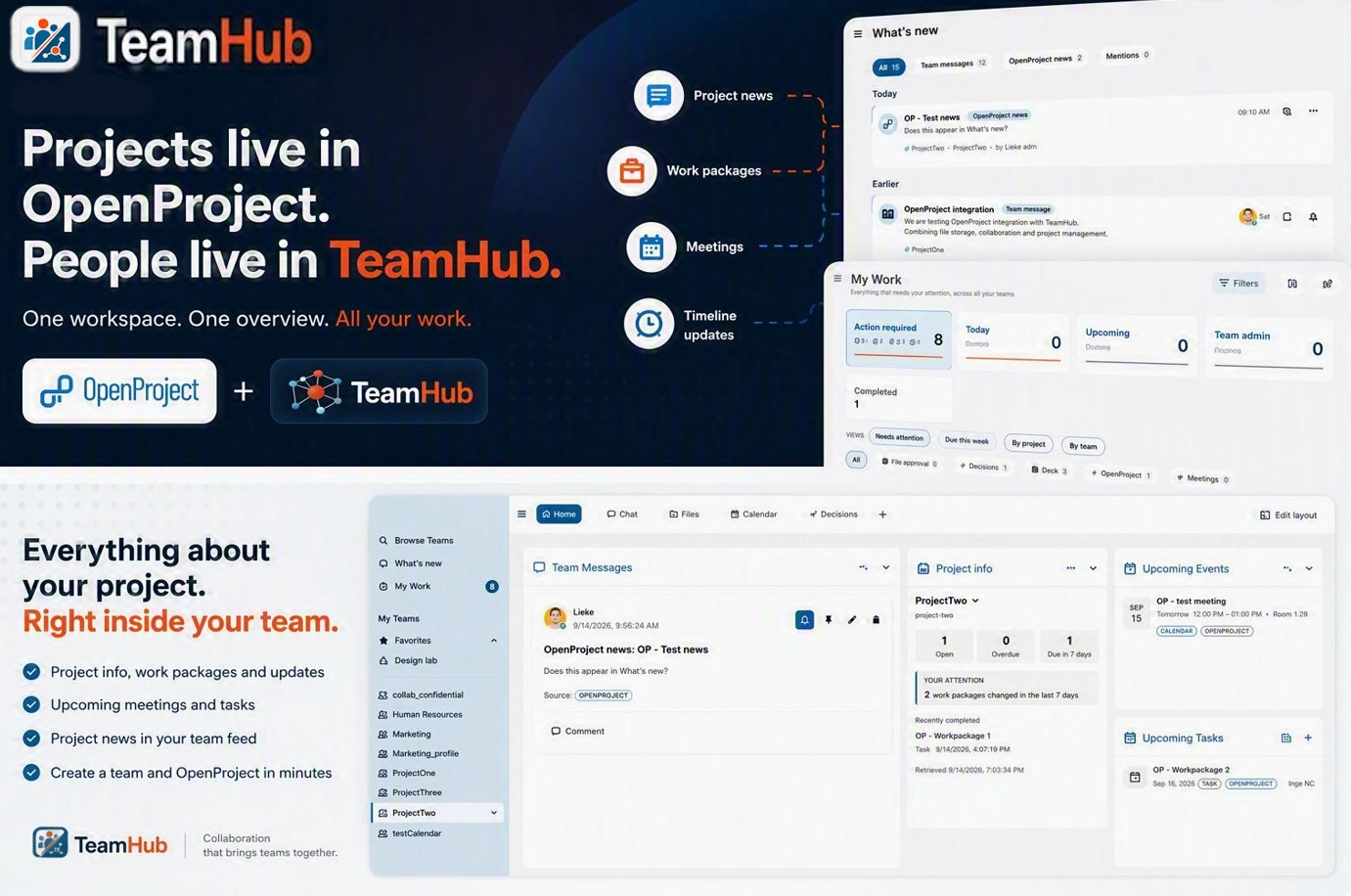
Project news in What's new, your work packages in My Work, and the project itself on the team home.
What you can do
- Switch it on as an administrator. Admin → TeamHub → Integrations → Modules → OpenProject module. It needs the OpenProject Integration app configured with your host, and each member connects their own OpenProject account.
- Create a team and its project from one wizard. Pick the OpenProject project template, then either create a new project (from an OpenProject template or empty) or connect one you administer. Members get matching OpenProject roles, and the project is made before the team, so you never end up with one without the other.
- See the project on the team home. A Project info widget with the project's status, its open, overdue and due-soon counts and the next milestone. The project's work packages appear in Upcoming tasks and its meetings in Upcoming events, copied one way into the team calendar.
- Raise a work package without leaving the team. Upcoming tasks → ⋯ → Create work package. It is created as you, and OpenProject validates it.
- Never miss news or a due date. OpenProject news gets its own tab in What's new and is mirrored once into the team's message stream, so members without an OpenProject account read it too. Your work packages show in My Work with the same overdue and due-soon rules as Deck cards.
Good to know
- Read as you, never through a shared account. Two members see what OpenProject shows each of them. TeamHub stores no OpenProject token.
- It writes only what you ask for. A project and its memberships from the wizard, a work package from the form. TeamHub never deletes an OpenProject project.
- Everything else hands off to OpenProject in a new tab. Completing a work package from My Work is not offered yet; the official integration app does not pass that request through.
- Off means off. With the module switched off every OpenProject surface disappears; nothing is deleted, and it all comes back when the module is switched on again.
A shorter source bar in My Work
Nine source tabs became seven: file approval and file reviews sit under Files, team admin and team expiration under Teams, and team lifecycle under Administration, which is now shown to Nextcloud administrators only. A source that is not available on your instance no longer gets an empty tab. The admin page behind it is a list with a detail pane instead of one long column of cards.
The new TeamHub mark
The app icon and the sidebar brand block now carry the new mark: a Hub Blue tile split by a Signal Orange diagonal, the team on the light field and the hub on the blue.

The License tab says what a licence adds
On an unlicensed instance, Admin → TeamHub → License now lists what a licence includes, matching the public licensing model, with a Request a quote button that pre-fills the instance identifier and the seats in use. The block disappears once a licence is active.
Opening a file no longer joins its chat for you
Opening a file from a team joined its Talk conversation on your behalf, so every file you looked at crowded your Talk list. The sidebar still opens on the Chat tab, but joining is now your click. Fixes issue #101.
Team messages load on any database table prefix
Two queries had the oc_ prefix hardcoded, so team messages failed to load on an instance with a different prefix. They now use Nextcloud's own prefix like every other query. Fixes issue #100.
No stray backslash in calendar event titles
An event TeamHub wrote to the team calendar with a comma or semicolon in its title, such as Plan, review, showed as Plan\, review. Events already on a calendar are not rewritten.
Nextcloud 35
Planned: 4.11.04.11.0 adds support for Nextcloud 35 and adopts many of the changes that are new in Nextcloud 35 and in Nextcloud Teams.
Commercial licences
In progressIn the coming week we set up the company that will sell and support commercial TeamHub licences. The licensing model is already public.
Dropping group folder support
Planned: 1st October releaseNextcloud Teams is making Team folders the files option going forward. We already support Team folders as well as Teams' default shared folder; if you still use shared folders, we encourage you to migrate.
Tip: add a Team folder next to the shared folder under Manage team → Modules & integrations → Team apps → Files, move the files across, then disconnect the shared folder.
MCP support
ResearchMCP (the Model Context Protocol) is an open standard that lets AI assistants talk to external tools and data. For TeamHub that would mean your team's messages, decisions, projects and files become context an assistant can read and act on safely, with the roles and permissions the team already has.
ServiceHub
ResearchA lightweight in-app option for support teams to triage and answer issues, with optional forwarding to dedicated support tools when a team already has one.
Items marked Research are exploratory, they may or may not make it to production. If you have thoughts on any of them, we'd love to hear from you: share your feedback.