Release notes for version 4.6.0
Here's what's shipping in this release and what we're planning — the new capabilities, the things we've refined, and the bugs we've squashed. Thanks for being on the ride.
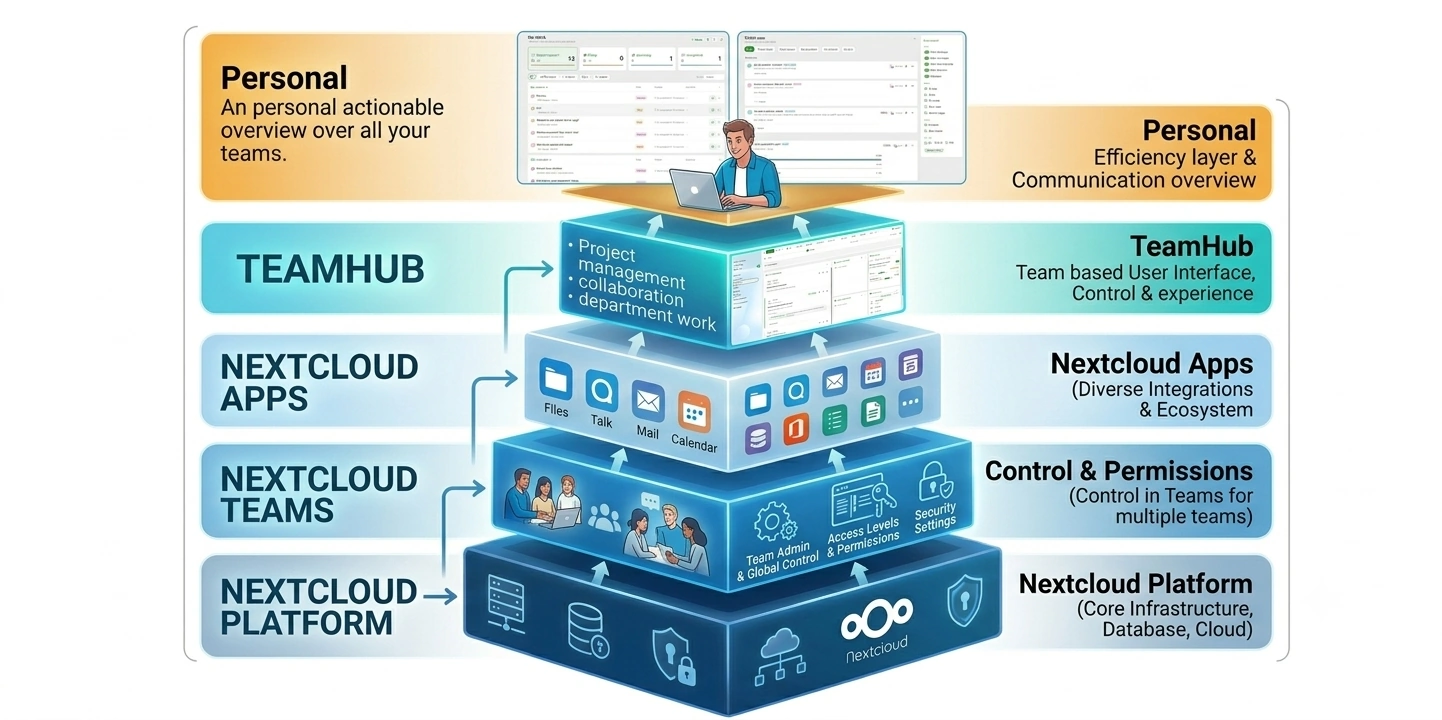
A personal layer above TeamHub
TeamHub has always been organised by team. This release adds a layer above it. What's new and My Work sit at the top of the sidebar and read across every team you belong to at once. One stream for everything that happened, one list for everything waiting on you.
Both are places you can act, not just places you read: reply to a message, vote in a poll, approve a file or complete a card without leaving the page. Nothing is copied and nothing becomes a new silo. Every action writes straight back to the Deck card, file, decision or poll it came from, and all of it runs inside your own Nextcloud.
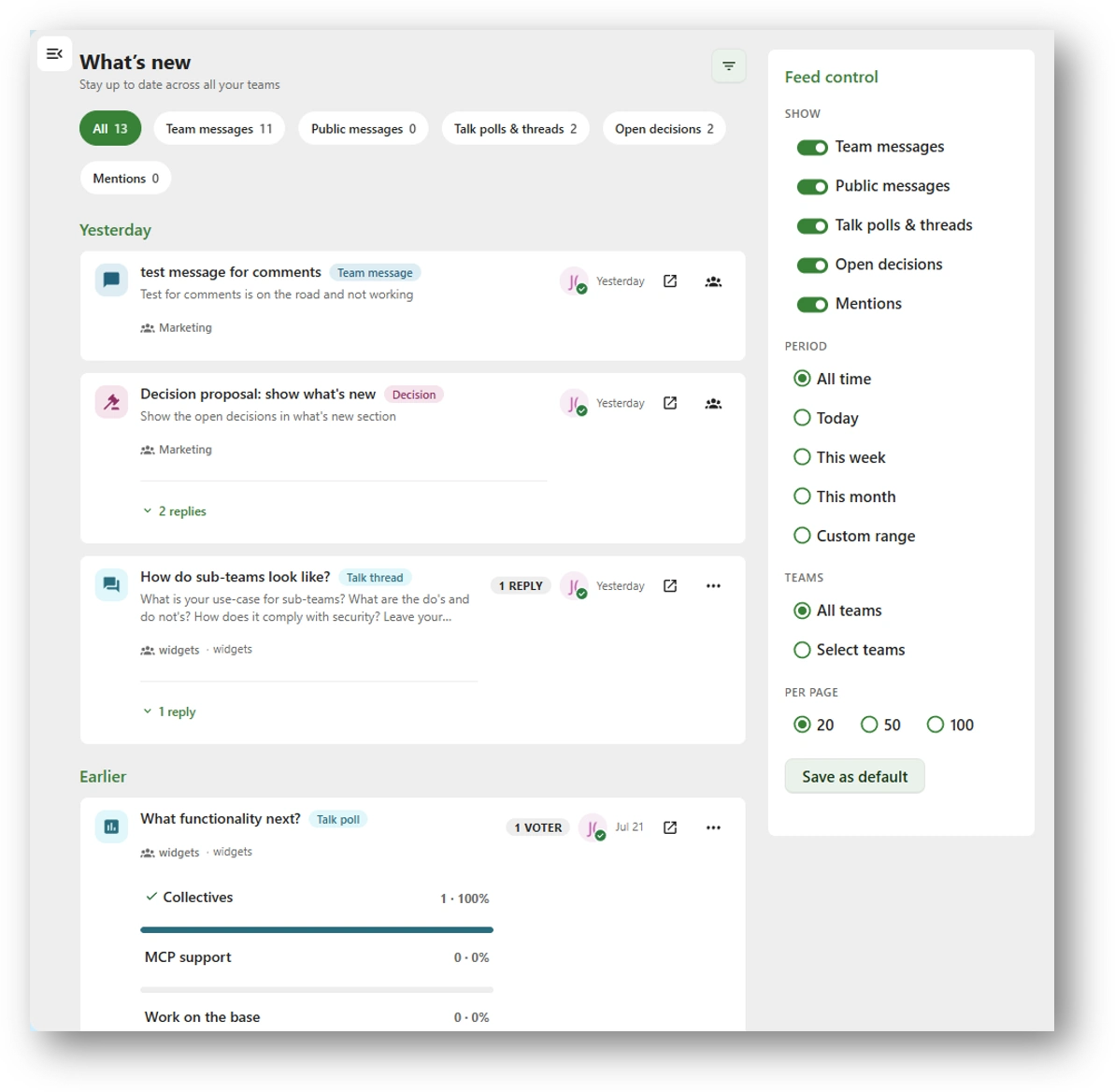
What's new
Every team's communication in one stream, grouped by day against your clock: Today, Yesterday or Earlier not the server's timezone.
- Six source tabs with live counts: All, Team messages, Public messages, Talk polls & threads, Open decisions, Mentions.
- Reply directly on items in the feed: New in this release. Vote in a Talk poll inline with live result bars, open a decision, or jump into the chat thread.
- Feed control rail for period, teams and page size: Save as default and your filter set comes back on every login, on every device.
- Mentions and Open decisions are lenses over the same rows, not separate lists.
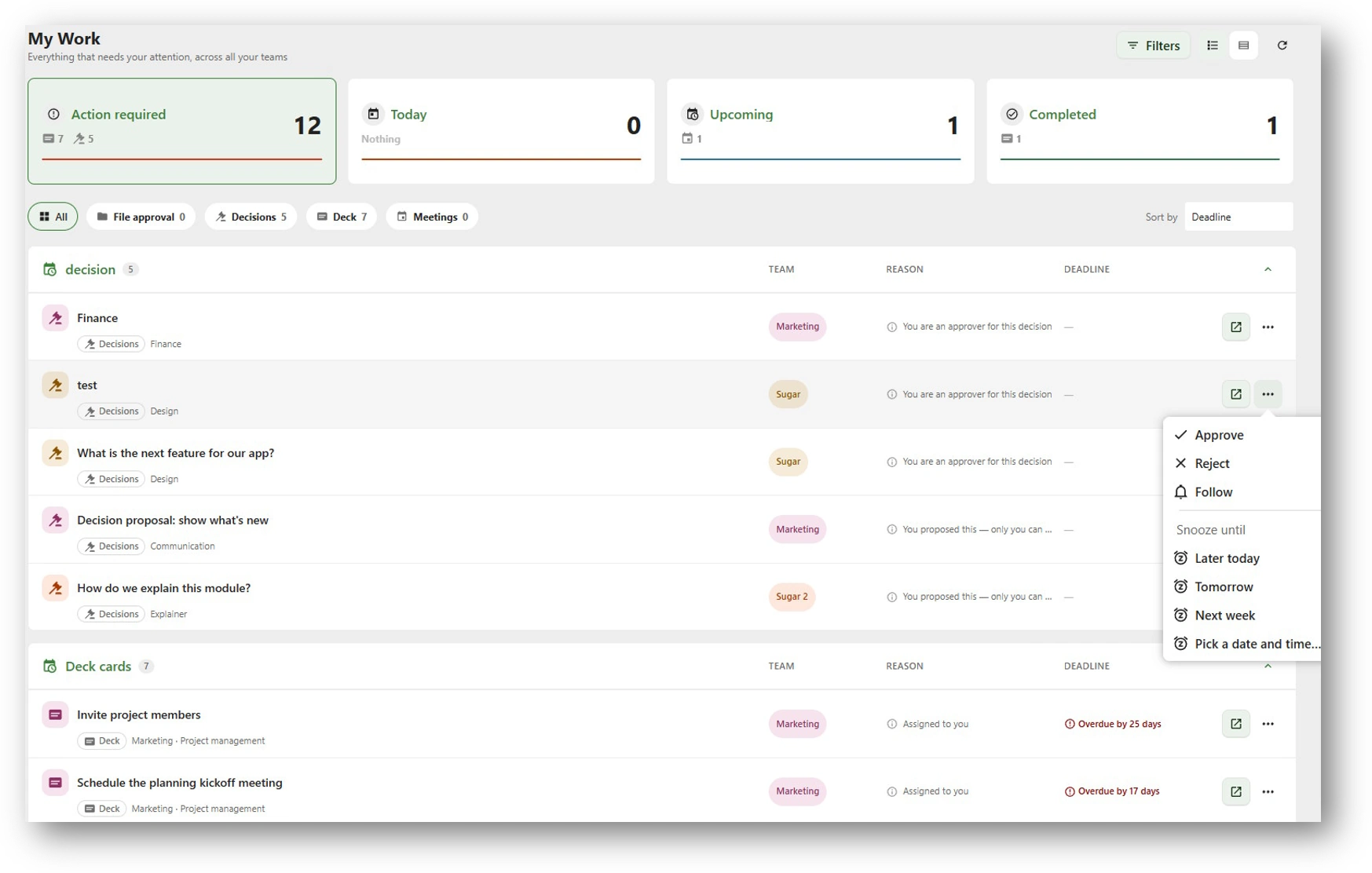
My Work
Every decision, task, approval, meeting and admin task waiting on you across all your teams, all of it actionable from the row.
- Action required, Today, Upcoming or Completed, four summary cards that double as filters. Waiting for others gets a panel of its own, because there the useful fact is who you're waiting on.
- Every row says why it's on your list: "Assigned to you", "You are an approver for this decision" beside its team badge and its deadline.
- Open lands on the exact card, file or decision, already selected in the tab it belongs to. Approve, Complete, Delegate and Snooze sit in the row menu.
- An item in more than one of your teams appears once, flagged not once per team.
- Added support for the Approval app. File approvals appear under My work
Getting it switched on: both sections need an active licence or trial key. Request a trial from Admin settings → TeamHub → Licence - What's new and My Work appear in the sidebar the moment it's active.
A personal layer above TeamHub: What's new and My Work
Trial key requiredThe one new feature in 4.6.0, and a big one: a personal layer that reads across every team you're a member of, giving you a single overview of all communication and all work items and letting you act on them in place.
It's covered in full at the top of this page, with a deeper walkthrough in the personal layer one-pager.
One avatar, on both sides
On Nextcloud 34 and later, a team's avatar is its Nextcloud Teams avatar. Eead from the same place rather than kept alongside it. The two can no longer drift apart, and a team looks the same wherever you meet it.
Existing teams need nothing from you: if a team has no Nextcloud Teams avatar yet, the one you set in TeamHub migrates across silently.
Links open in the tab that owns them
Files, chat, Deck cards, calendar events and wiki pages now open inside TeamHub, in the tab that owns them wherever you click them from. Previously every one of those links threw you into a separate browser window, and finding your way back was your problem.
This holds for links in the feed, in widgets and in the team tabs alike, which is what makes acting from What's new and My Work feel like one place rather than a launcher.
Collaboration: the file conversation is just there
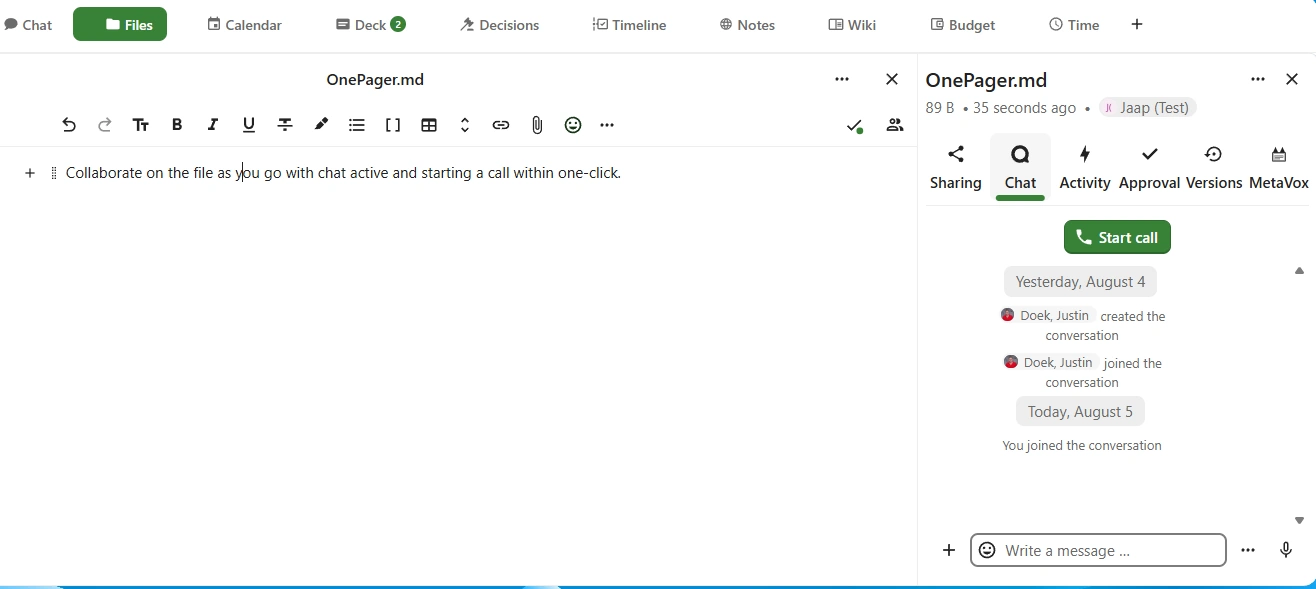
Opening a file now shows the sidebar and the file conversation straight away. Getting to that same view used to take six interactions which in practice meant most people never got there, and the conversation about a document happened somewhere the document couldn't see.
Decisions: ask before you finalize
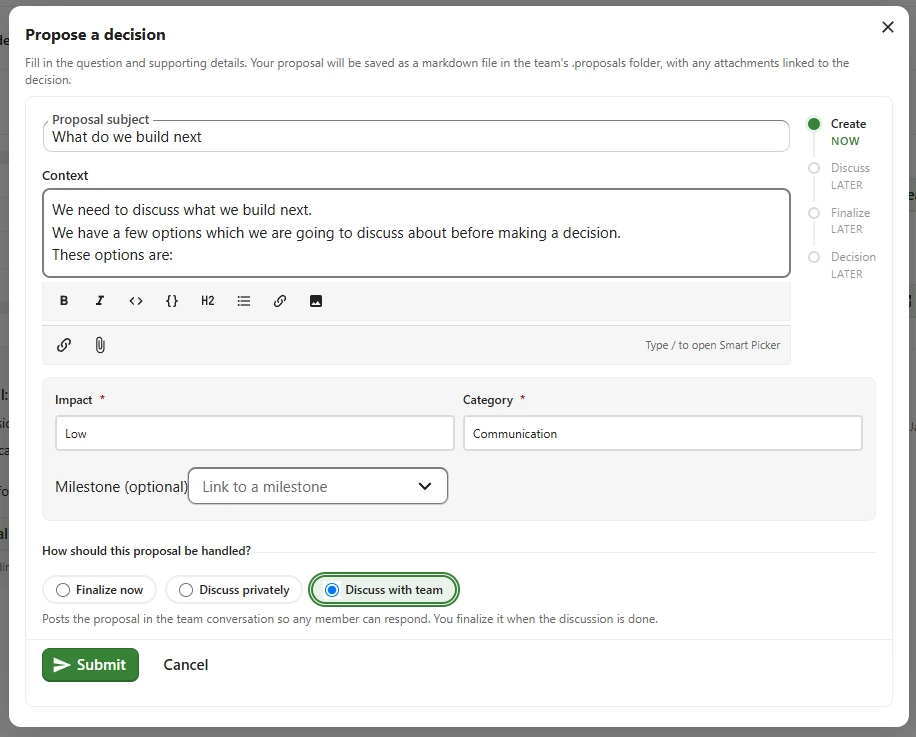
Proposals are now created from the widget or the Decisions tab, and they have a step in front of the decision itself: you can request feedback from the whole team or from named individuals before anything is finalized. The feedback can be gathered from Talk.
Proposals surface in Talk if you want to discuss with the team or selected members, My Work for the people whose feedback you asked for, and in What's new for the team so a request for input lands where that person already looks, rather than depending on them opening the team.
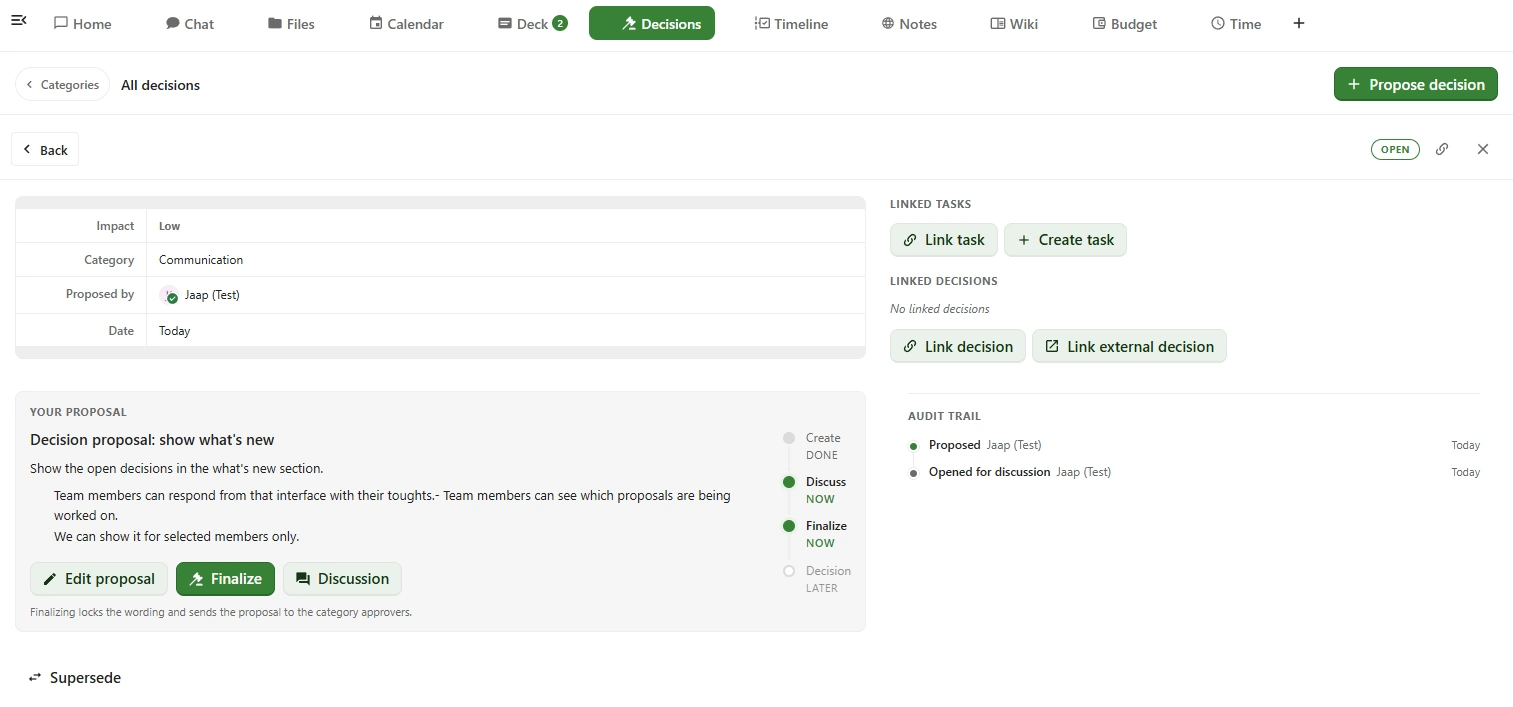
The owner of the proposal can find it in the decisions module. It shows in the category you selected with the status Open. Under YOUR PROPOSAL you find the buttons to edit the proposal, go to the discussion or finalize it so it can be decided upon.
.
The members widget email icon prefers Nextcloud Mail
Clicking the email icon in the members widget handed you straight to your desktop mail client. It now tries Nextcloud Mail first and only falls back to the default mail app when Mail isn't available, writing to a team member stays inside the browser you're already working in.
Fixes issue #72.
Collectives writes rejected by Nextcloud's typed config
A misbehaving config entry caused Collectives writes to be rejected by Nextcloud's typed IConfig with no recovery row to fall back on, logged as [TeamHub][CollectivesService].
If you hit this, repair the team under Admin settings → TeamHub → Maintenance tab and it resolves. Fix the team settings afterwards under manage team → Settings tab This is a partial fix for issue #71. Work on the remainder continues.
Disabling comments now actually hides them
Turning comments off left the comment section on screen. It's now hidden when disabled, and the setting is configurable per category rather than all-or-nothing.
Fixes issue #70.
Adding a resource requires admin approval again
Adding a resource to a team had quietly stopped requiring team admin approval. A gate that had slipped rather than a setting anyone changed. Approval is back in the path where it belongs.
Dropping Nextcloud 32 support
Planned: 1st September releaseWe support the two latest versions of Nextcloud. You can still run TeamHub on Nextcloud 32 with the last release before the 1st September release, but those builds will be out of development support after that. Plan your upgrade(s) accordingly.
Dropping group folder support
Planned: 1st October releaseNextcloud Teams is going to make Team folders the files option going forward. We already support Team folders as well as Teams' default shared folder if you still use shared folders, we encourage you to migrate to Team folders.
Tip: You can add a Team folder next to the shared folder under Manage team → Integrations → Team apps → Files. Then move the files from the shared folder into the new Team folder and disconnect the shared folder.
MCP support
ResearchMCP (the Model Context Protocol) is an open standard that lets AI assistants talk to external tools and data sources through a common interface. Think of it as a universal adapter between models like Claude or ChatGPT and the apps you actually use.
For TeamHub that would mean your team's messages, decisions, presence, projects, and files become first-class context an AI assistant can read and act on safely, with the same roles and permissions the team already has. We're exploring what a first useful surface looks like.
ServiceHub
ResearchStarted research on ServiceHub as a team option for support teams. The idea is a lightweight in-app choice for triaging and answering issues, with optional forwarding to dedicated support tools when a team already has one in place.
Items marked Research are exploratory, they may or may not make it to production. If you have thoughts on any of them, we'd love to hear from you: share your feedback.