Give every team a home inside the Nextcloud you already trust.
TeamHub is a free, open-source team workspace and project management app for Nextcloud. It turns each Nextcloud Team into a real workspace — messages, decisions, presence, projects and the apps you already use, all on one screen, running on your own server.
Your teams don't lack tools. They lack a place where the tools agree.
The budget is in a spreadsheet. Decisions live in chat threads. The project plan is in one person's head. By the time something slips, you find out at the retro.
Meetings without outcomes
Long calls, no owners, decisions vanish into someone's notes. By Friday, nobody remembers what was agreed.
Decisions lost in threads
The important call was made in a Talk room three weeks ago. Now someone needs to trace it back good luck.
Hidden work, no visibility
Who's in the office today? Who's off? Who's handling the client escalation? Everyone has to ask.
Projects that surprise you
The budget's blown, the milestone slipped last week, and nobody flagged it. You find out at the client call.
One dedicated home per team.
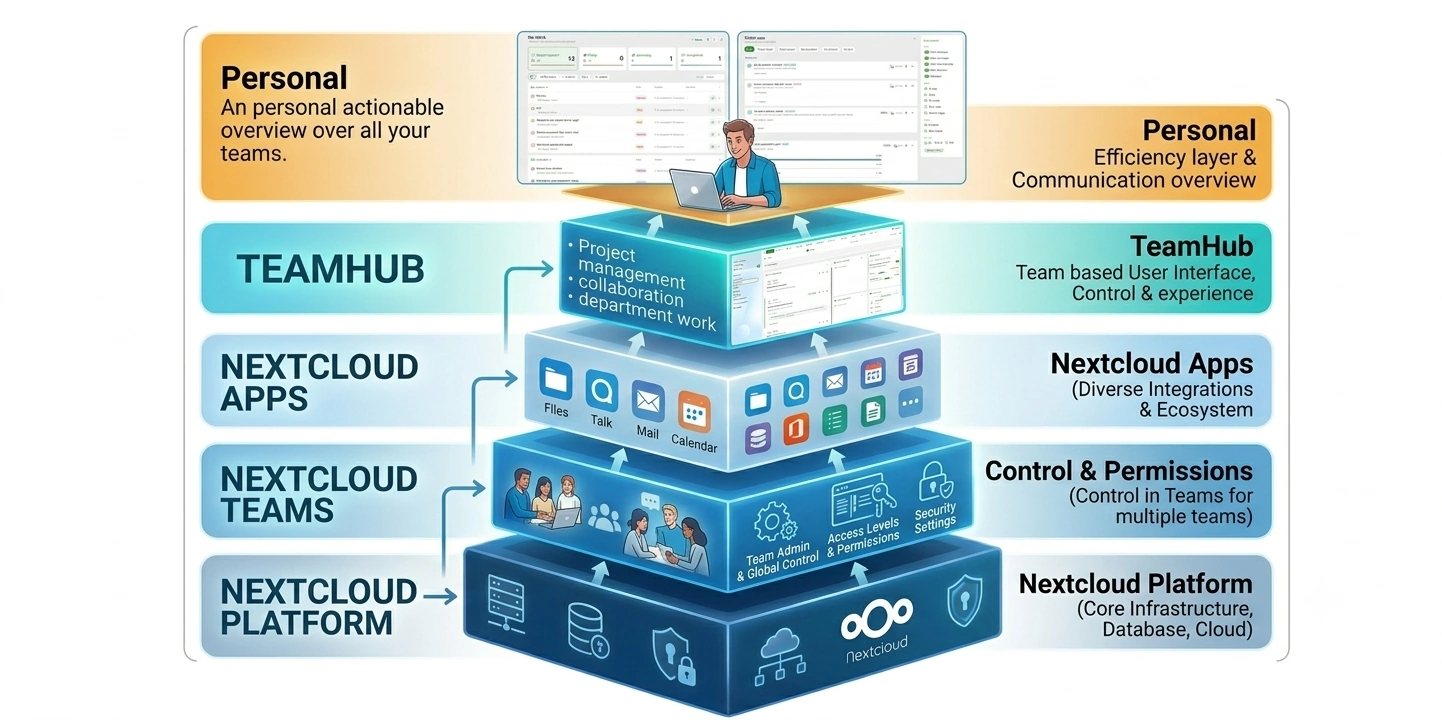
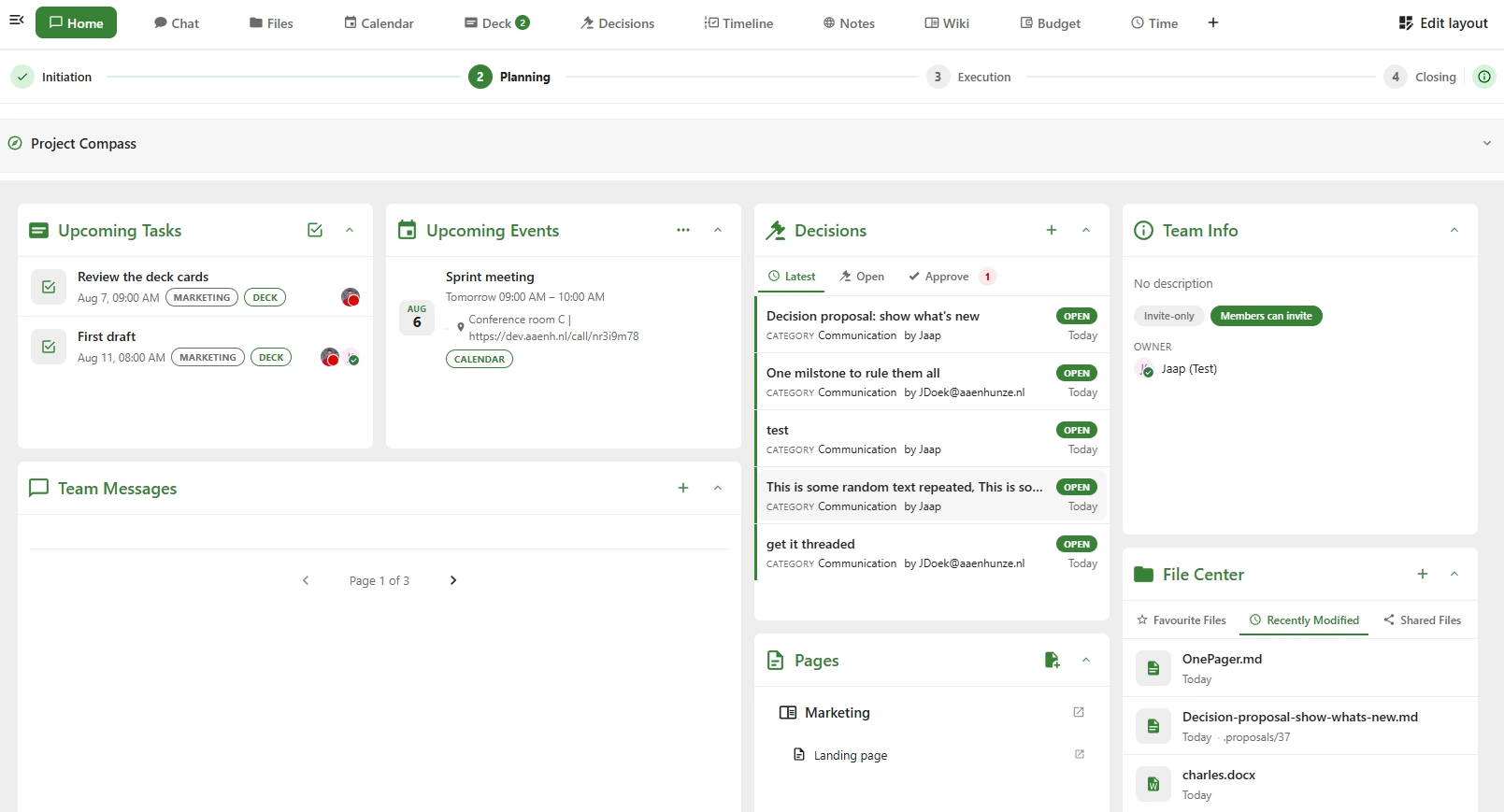
TeamHub gives every Nextcloud Team its own workspace. A tab bar linking Talk, Files, Calendar, Deck and the apps you already run — plus a persistent message stream, a live activity feed, and modules that keep decisions, presence and projects visible without extra meetings.
No new tools to buy. No data leaves your Nextcloud. Just a workspace layer on top of what you already have.
That makes it a sovereign solution: your teams, their messages and their decisions stay on hardware you control, under a licence nobody can withdraw. No foreign jurisdiction, no seat count, no vendor holding your collaboration hostage.
Six things that stop being your problem.
TeamHub is a set of small, practical modules that each solve one recurring headache with the sum being a workspace your teams actually stay in.
Everyone knows where to look.
One home page per team. Tab bar, message stream, widgets, activity feed. New joiners find their context by scrolling, no handover meeting.
Team workspaceDecisions that survive the meeting.
A structured propose → finalise → approve workflow. Categories, per-category approvers, and a full audit trail. Point back to any decision, months later.
Decisions moduleKnow where your team is, right now.
Every member publishes their working location each half-day office, home, vacation, unavailable. Week grid for the whole team. Syncs to Nextcloud Calendar automatically.
Presence moduleOnboard by scrolling.
A 30-day timeline showing files, calendar events, decisions, and card updates scoped to the team. New teammates catch up without asking anyone.
Activity feedProjects on-track, without weekly status.
PMC phases, guided setup Compass, per-lane budget & time tracking, and a live health widget that flags slippage the moment it happens.
Advanced ProjectsThe tools you already use, in one nav bar.
Add any URL as a tab. Disable apps per team. Every user drags tabs into their own preferred order. Meetings, dashboards, internal tools all one click away.
Custom tabs & meeting automationOne workspace. Everything connected.
TeamHub is a Nextcloud app that gives every team a dedicated home with its own modules, the Nextcloud apps you already use, and room for anything else through the developer API.
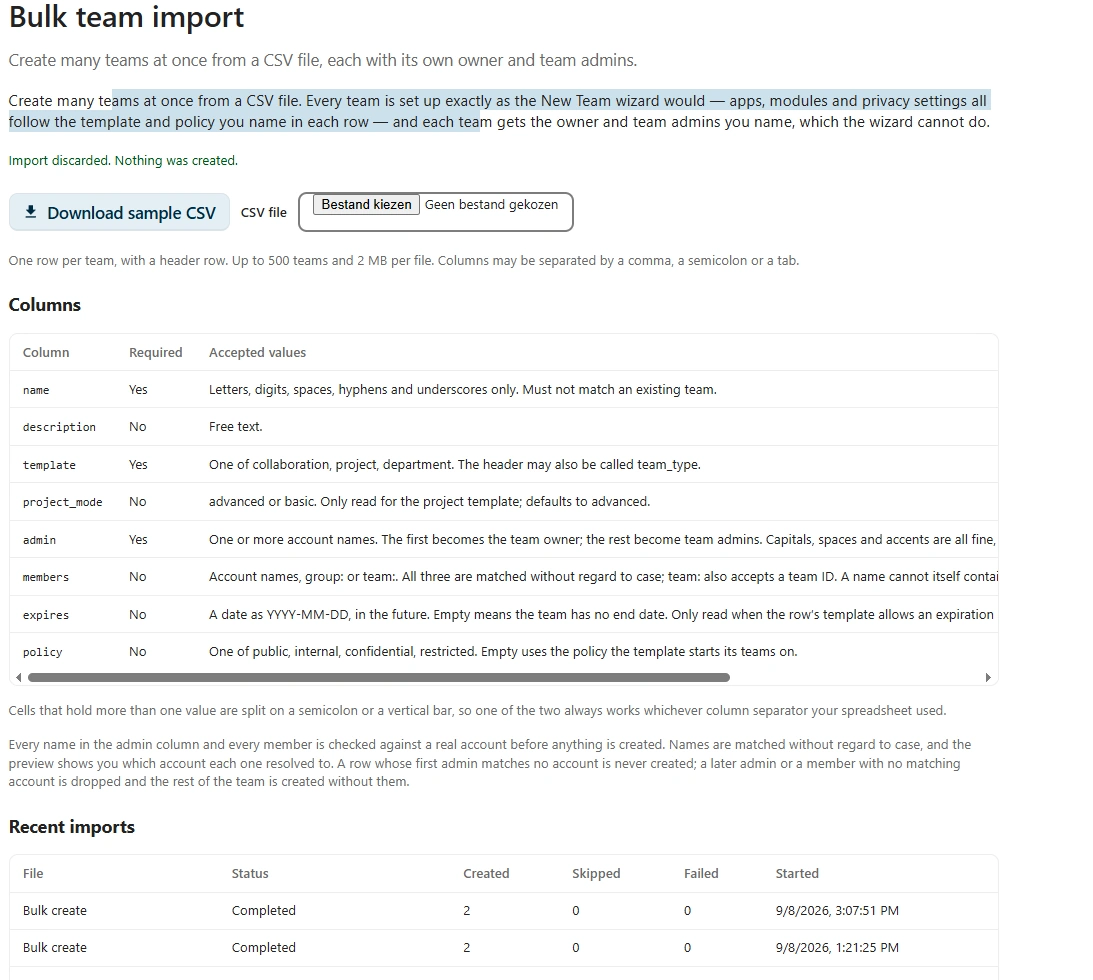
Migrate from Microsoft Teams without rebuilding a thing.
Switching platforms normally means re-creating every team by hand, which is why most migrations stall. Bulk import takes one CSV and builds them all.
Above your teams: see what changed, do what's needed.
Being useful in more than one team means checking all of them, every morning. What's new and My Work sit on top of TeamHub and read across every team you belong to, so the round trip disappears.
Know where your team is, right now.
Stop asking around every morning. Every member publishes their location per half-day; the team view collects it into one live grid, and everyone's schedule syncs to their Nextcloud Calendar.
Deliver every project on time, on budget, on track.
For agency owners, project managers & team leads. Turn any Nextcloud Team into a guided, phased project workspace with a live health widget so slippage surfaces the moment it happens, not at the retro.
TeamHub is free & open source. Here's how you can keep it that way.
Every install helps. Every trial licence funds the next module. Every piece of feedback shapes what ships. Pick whichever suits you.
Install it and use it
Free under AGPL-3.0. Download from the Nextcloud App Store, enable, done. Every install is a signal that this matters and shows up in our numbers.
Install from the App StoreSupport development
Contact us at teamhub@tldr.host for more information
Support & optionsSend us feedback
What's missing? What's broken? Which module would change how your teams work? File an issue on GitHub or drop us a mail every piece of feedback shapes the roadmap.
Open an issue on GitHubFrequently asked questions.
The things people ask before they install. If yours isn't here, the docs go deeper.
Give your teams a proper home.
Free, open source, self-hosted. Runs on your own Nextcloud, on top of the apps you already trust — your team’s content never leaves your server.
AGPL-3.0 · Nextcloud app · Anonymous usage telemetry, disabled by any licence