For company owners & team leaders

Give every team a home inside the Nextcloud you already trust.

TeamHub is a free, open-source team workspace and project management app for Nextcloud. It turns each Nextcloud Team into a real workspace — messages, decisions, presence, projects and the apps you already use, all on one screen, running on your own server.
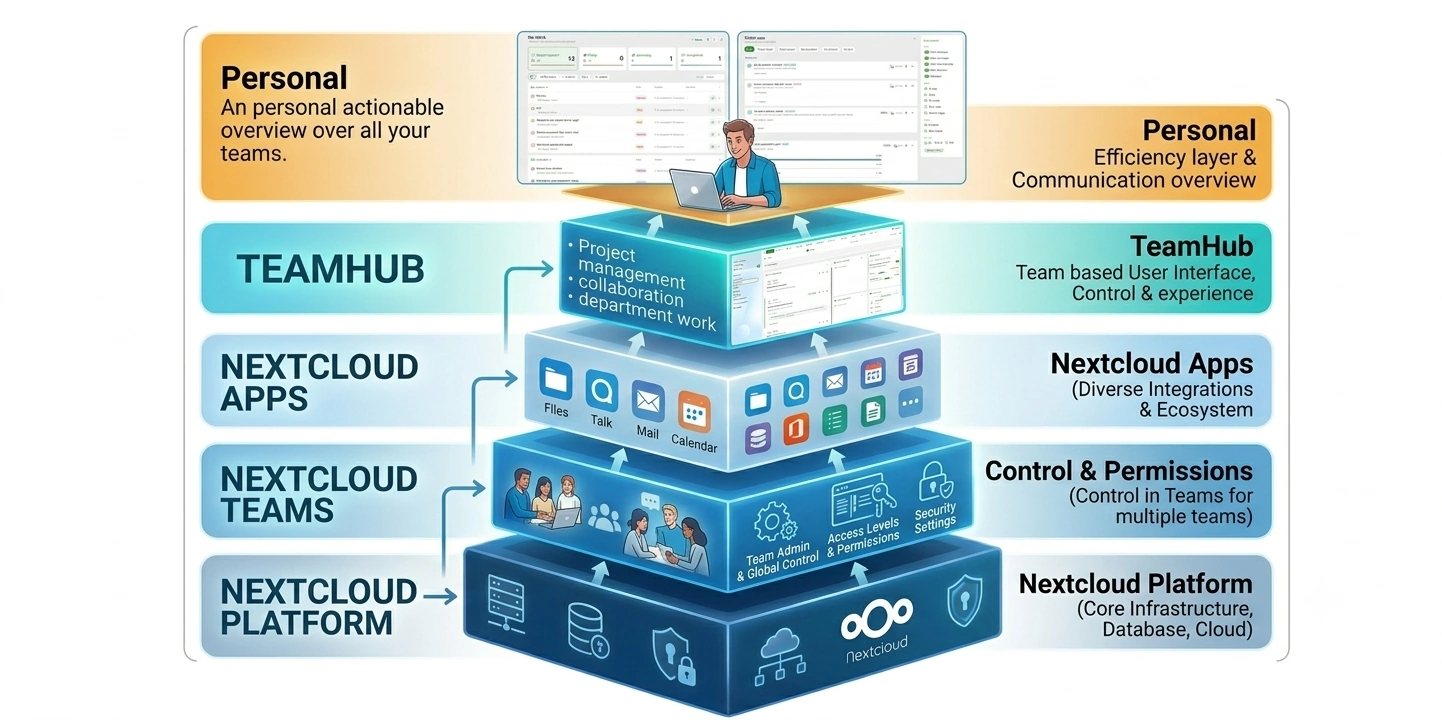
Five stacked layers drawn as a pyramid, each resting on the one below. From the bottom: Nextcloud Platform, core infrastructure, database and storage. Nextcloud Teams, membership and permissions across multiple teams. Nextcloud Apps, Files, Talk, Mail, Calendar and the wider ecosystem. TeamHub, the team-based interface for projects, decisions and collaboration. Personal, an actionable overview across every team you are in.
Five layers, one direction of travel. Every layer only adds to the one beneath it. Nothing is copied, and nothing becomes a new silo.
507
Active installations
2,095
Active teams
43,310
Users reached
Live in the Nextcloud App Store since 20 April 2026
The problem

Your teams don't lack tools. They lack a place where the tools agree.

The budget is in a spreadsheet. Decisions live in chat threads. The project plan is in one person's head. By the time something slips, you find out at the retro.

Meetings without outcomes

Long calls, no owners, decisions vanish into someone's notes. By Friday, nobody remembers what was agreed.

Decisions lost in threads

The important call was made in a Talk room three weeks ago. Now someone needs to trace it back good luck.

Hidden work, no visibility

Who's in the office today? Who's off? Who's handling the client escalation? Everyone has to ask.

Projects that surprise you

The budget's blown, the milestone slipped last week, and nobody flagged it. You find out at the client call.

The solution

One dedicated home per team.

TeamHub gives every Nextcloud Team its own workspace. A tab bar linking Talk, Files, Calendar, Deck and the apps you already run — plus a persistent message stream, a live activity feed, and modules that keep decisions, presence and projects visible without extra meetings.

No new tools to buy. No data leaves your Nextcloud. Just a workspace layer on top of what you already have.

That makes it a sovereign solution: your teams, their messages and their decisions stay on hardware you control, under a licence nobody can withdraw. No foreign jurisdiction, no seat count, no vendor holding your collaboration hostage.
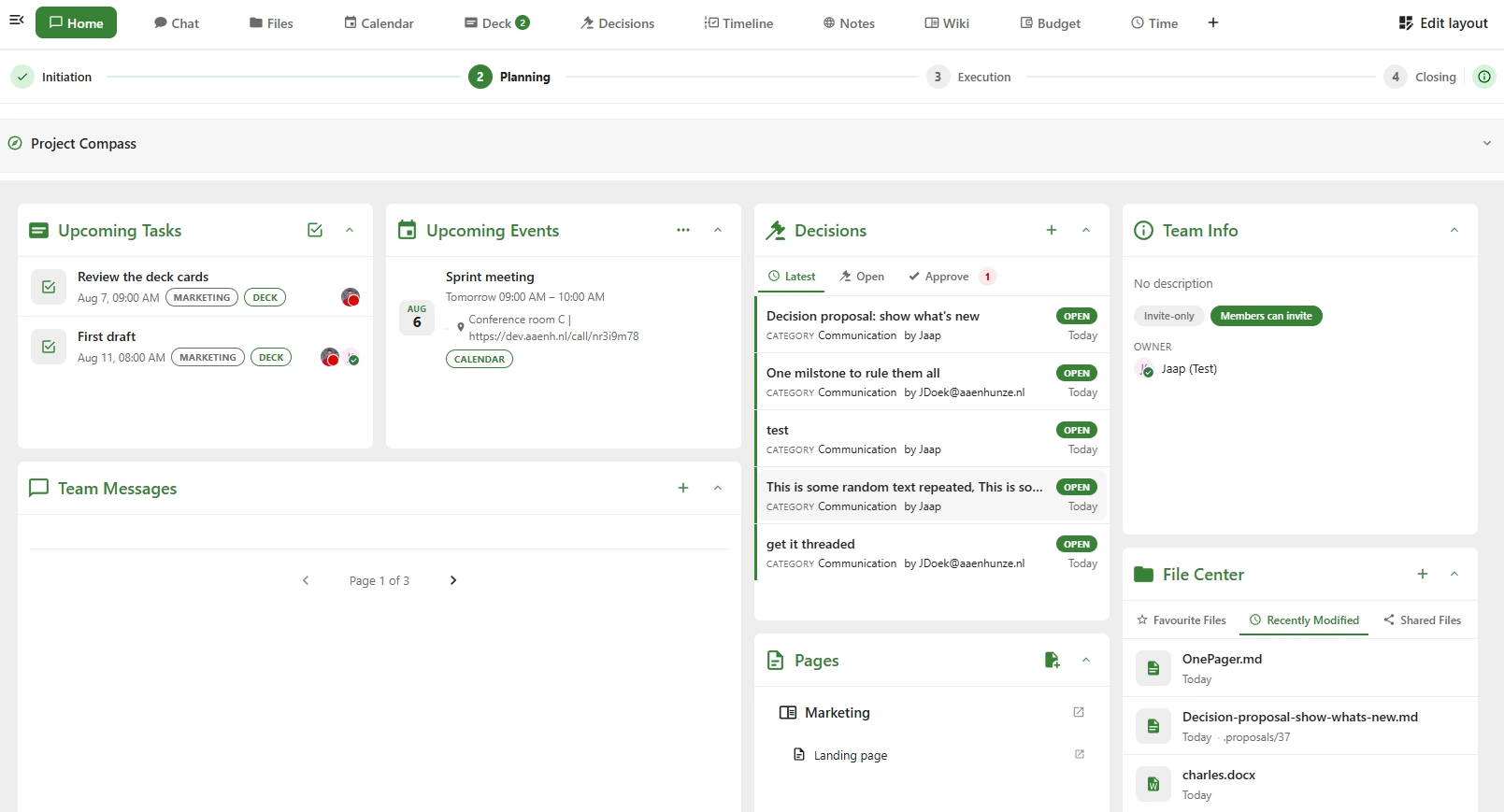
Team Home — Marketing
TeamHub team messages board with pinned announcements and threaded discussion
What it fixes

Six things that stop being your problem.

TeamHub is a set of small, practical modules that each solve one recurring headache with the sum being a workspace your teams actually stay in.

Everyone knows where to look.

One home page per team. Tab bar, message stream, widgets, activity feed. New joiners find their context by scrolling, no handover meeting.

Team workspace

Decisions that survive the meeting.

A structured propose → finalise → approve workflow. Categories, per-category approvers, and a full audit trail. Point back to any decision, months later.

Decisions module

Know where your team is, right now.

Every member publishes their working location each half-day office, home, vacation, unavailable. Week grid for the whole team. Syncs to Nextcloud Calendar automatically.

Presence module

Onboard by scrolling.

A 30-day timeline showing files, calendar events, decisions, and card updates scoped to the team. New teammates catch up without asking anyone.

Activity feed

Projects on-track, without weekly status.

PMC phases, guided setup Compass, per-lane budget & time tracking, and a live health widget that flags slippage the moment it happens.

Advanced Projects

The tools you already use, in one nav bar.

Add any URL as a tab. Disable apps per team. Every user drags tabs into their own preferred order. Meetings, dashboards, internal tools all one click away.

Custom tabs & meeting automation
How it fits

One workspace. Everything connected.

TeamHub is a Nextcloud app that gives every team a dedicated home with its own modules, the Nextcloud apps you already use, and room for anything else through the developer API.

TeamHub
Team Messages
Decisions
What's new
Timeline
Presence
Custom Links
My Work
Advanced Projects
Deck
Calendar
Intravox
Talk
Team Folders
Approval
Collectives
+ Your widget
+ Your tab
+ Your integration
+ Anything else
Foundation
Nextcloud TeamsMembership backbone
NextcloudSelf-hosted platform
Internal modules, built into TeamHub
Nextcloud apps, reused and auto-detected
External integrations, via the developer API
Bulk importNew in 4.6.11

Migrate from Microsoft Teams without rebuilding a thing.

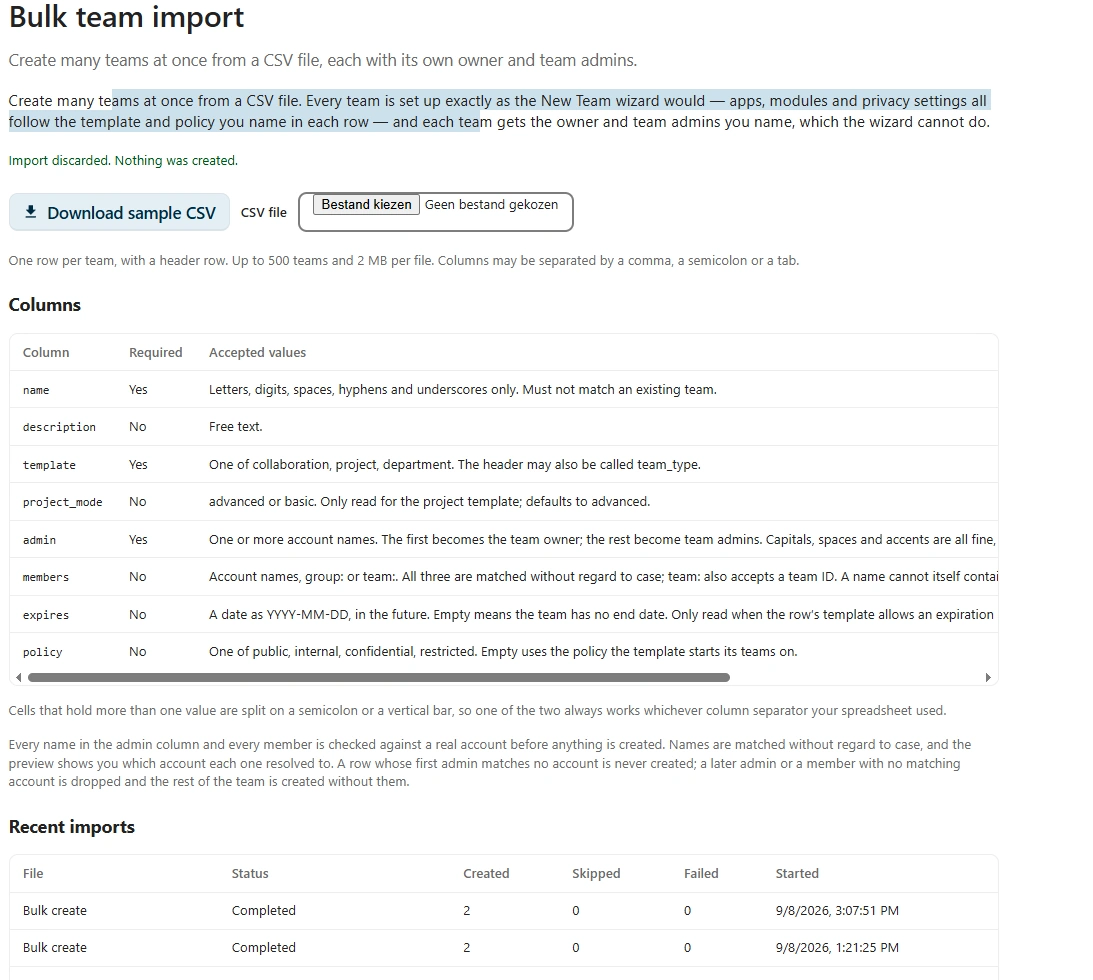
Switching platforms normally means re-creating every team by hand, which is why most migrations stall. Bulk import takes one CSV and builds them all.

Microsoft Teams Slack Spreadsheet TeamHub

One file in. Every team out.

Anything that exports to CSV can seed TeamHub. A single file carries the name, description, template, project mode, owner, members, apps and modules for each team, so what arrives is a working workspace rather than an empty shell.

  • Dry run before anything exists: every row is validated and every account resolved, so you see the errors while they are still cheap to fix.
  • Commas, semicolons or tabs whichever separator your export produced. Members split on semicolons or vertical bars.
  • Owners, admins and members are matched to real accounts and unresolved names are reported rather than silently dropped.
  • A row asking for advanced projects without a licence becomes a basic project instead of failing, so one missing licence never stops the import.

This is the shortest path off a hyperscaler. The same teams, the same people, now on hardware you own under a licence nobody can withdraw a sovereign solution your organisation actually controls.

1
Export what you have Grab the sample file from Admin settings → TeamHub → Import/Export and match your columns to it.
2
Pick a template per team Project, collaboration or department. It decides which modules each new team starts with.
3
Upload and dry run Resolved accounts, flagged rows and a full preview, before a single team is created.
4
Confirm, then check the receipt Teams appear with live progress and a results CSV comes back with the outcome of every row.
500teams per file
2 MBmax upload
8columns per team
The personal layerNew

Above your teams: see what changed, do what's needed.

Being useful in more than one team means checking all of them, every morning. What's new and My Work sit on top of TeamHub and read across every team you belong to, so the round trip disappears.

1 What's new

Everything that happened, in one stream.

Open one view instead of five teams. The counts on the tabs tell you where the news is before you read a single word, and the day sections keep it scannable.

  • Six source tabs with live counts: All, Team messages, Public messages, Talk polls & threads, Open decisions, Mentions.
  • Sectioned into Today, Yesterday and Earlier, worked out against your clock, not the server's timezone.
  • A feed control rail for period, teams and page size. Save as default and your filters come back on every login, on every device.
  • Mentions and Open decisions are lenses over the same rows, not separate lists. A decision is still a team message.
What's new, full view. Source tabs carry their own counts: All 13, Team messages 11, Public messages 0, Talk polls and threads 2, Open decisions 2, Mentions 0. Yesterday and Earlier day sections hold a team message, an open decision, a Talk thread and a Talk poll with live result bars. The Feed control rail on the right has Show toggles, Period, Teams, Per page and Save as default.
One stream, every team. The tabs carry their own counts, and the feed control rail on the right is saveable as your default.
2 My Work

Everything waiting on you, ordered by urgency.

One list across every team, ordered so the answer to "what needs me first?" is at the top of the page rather than at the end of a scroll.

  • Action required, Today, Upcoming and Completed: four summary cards that double as filters. Waiting for others gets a panel of its own.
  • Each card breaks down by source, so Action required 12 reads as seven Deck cards and five decisions before you open it.
  • Every row says why it is on your list, beside its team badge and its deadline: assigned to you, you are an approver, you proposed this.
  • An item in more than one of your teams appears once, flagged, rather than once per team.
My Work, full view. Four summary cards: Action required 12, broken down as 7 Deck cards and 5 decisions, Today 0, Upcoming 1, Completed 1. A source tab row shows All, File approval 0, Decisions 5, Deck 7, Meetings 0. Rows grouped by resource type show team badges, a reason per row and deadlines including two overdue Deck cards. A row menu is open with Approve, Reject, Follow and Snooze until presets.
Action required is the only number on the sidebar counter, because it is the one that is genuinely meant to reach zero.

Read it, then do something about it, in the same view.

This is what makes it a layer rather than a digest. The round trip into the team disappears, because most items are one click from done.

The Open decisions tab active in What's new. The feed is narrowed to open decisions while the other source tabs keep their own counts.
Narrow to what needs deciding The feed filters down while every other tab keeps its own count.
A Talk poll card inside the What's new feed, showing the options, live percentage bars and a check mark on the option that was picked.
Vote in the feed Talk polls render inline with live result bars. Pick an option and the bars move.
A single My Work row with its action menu open, showing Approve, Reject, Follow and the Snooze until presets.
Act on the row Approve, Reject, Follow and the Snooze presets, without opening the team first.
Most consequential verb first Open has a button of its own. Approve, Reject, Complete, Request changes, Delegate, Comment and Follow sit in the row menu, in that order.
Snooze on your clock Later today, tomorrow, next week or a moment you pick, resolved in your timezone. "Tomorrow at 9" means yours.
Open lands on the thing Not just the team. The exact card, file or decision, already selected in the tab it belongs to.
It writes straight back down Every action lands on the Deck card, the file, the decision or the poll it came from. The source app stays the source of truth.
Presence module

Know where your team is, right now.

Stop asking around every morning. Every member publishes their location per half-day; the team view collects it into one live grid, and everyone's schedule syncs to their Nextcloud Calendar.

Team week gridEveryone's Morning / Afternoon status across Mon–Fri, in one view.
Calendar syncWrites to each member's default Nextcloud Calendar free / busy handled automatically.
Office locationsAdmins define building → floor → room. Members pick a room when setting Office status.
Admin-locked holidaysAdd company holidays once, members see a locked cell and can't override.
Team Presence — week view
May 19 – 23
Mon
Tue
Wed
Thu
Fri
JD
Justin
Office
Office
Home
Office
Home
ML
Maria
Home
Home
Office
Vacation
Vacation
TK
Thomas
Office
Home
Home
Office
AV
Anna
Home
Office
Office
Home
Office
Home
Vacation
No entry
Advanced project module

Deliver every project on time, on budget, on track.

For agency owners, project managers & team leads. Turn any Nextcloud Team into a guided, phased project workspace with a live health widget so slippage surfaces the moment it happens, not at the retro.
Licence-gated · Trial available

The Nextcloud Team becomes your single source of truth.

Four PMC phases — Initiation → Planning → Execution → Closing. A guided Project Compass tells the PM what to do next. Budget, time, milestones and health all live on the team home, feeding each other.

  • Project Compass: a next-up prompt and setup checklist so any PM can pick up any project.
  • Budget & Time: per-workstream lanes, project-wide roll-ups, per-lane and per-member reports.
  • Milestones own Deck cards slippage on a card lights the milestone, which lights the health widget.
  • Closing artifact writes decisions, budget, time and milestones as markdown into the team folder.
Budget & Time
1 lane over
Milestones
2 / 3 on track
Quality
1 open decision
Init Planning Execution Closing
How you can support us

TeamHub is free & open source. Here's how you can keep it that way.

Every install helps. Every trial licence funds the next module. Every piece of feedback shapes what ships. Pick whichever suits you.

01 · The easiest way

Install it and use it

Free forever under AGPL-3.0. Download from the Nextcloud App Store, enable, done. Every install is a signal that this matters and if you leave telemetry on, it shows up in our numbers.

Install from the App Store
02 · The direct way

Support development

Contact us at teamhub@tldr.host for more information

Support & options
03 · The generous way

Send us feedback

What's missing? What's broken? Which module would change how your teams work? File an issue on GitHub or drop us a mail every piece of feedback shapes the roadmap.

Open an issue on GitHub
Questions

Frequently asked questions.

The things people ask before they install. If yours isn't here, the docs go deeper.

What is TeamHub for Nextcloud?
TeamHub is a free, open-source Nextcloud app that turns every Nextcloud Team into a dedicated workspace. Each team gets its own home with a message board, an activity timeline, decisions, presence, project tools and a tab bar linking the Nextcloud apps you already run, such as Talk, Files, Calendar and Deck.
How much does TeamHub cost?
TeamHub is free and licensed under AGPL-3.0. The core workspace, decisions, presence, activity timeline, What's new and My Work are all free with no user limit. Only the advanced project module is licence-gated, and it has a free trial.
Does TeamHub replace Nextcloud Deck or Nextcloud Talk?
No. TeamHub sits on top of them. Deck stays the source of truth for cards and Talk stays the source of truth for conversations. TeamHub reads across them, shows them in one place and writes actions straight back to the original app, so nothing is copied and no new silo is created.
Can I use Nextcloud for project management with TeamHub?
Yes. The advanced project module turns any Nextcloud Team into a phased project workspace with four PMC phases, a guided Project Compass, budget and time tracking per workstream, milestones that own Deck cards, and a live health widget that surfaces slippage as it happens rather than at the retrospective.
Does any TeamHub data leave my server?
No. TeamHub runs entirely inside your own Nextcloud instance and stores its data in your own database. Nothing is sent anywhere else unless you explicitly switch on the opt-in telemetry, which reports anonymous usage counts only.
What are the requirements to install TeamHub?
TeamHub needs a working Nextcloud instance with the Teams (Circles) app enabled and PHP 8.1 or newer. Install it from the Nextcloud App Store in the usual way, then enable it for the teams that need it.
Can I migrate from Microsoft Teams to TeamHub?
Yes. Since version 4.6.11 TeamHub can bulk-import teams from a CSV file, so anything you can export from Microsoft Teams, Slack or a spreadsheet can be turned into working TeamHub teams in one upload. Each row carries the team's name, description, template, owner, members, apps and modules. Up to 500 teams can be created per file, and a dry run shows you resolved accounts and errors before anything is created. See bulk import for the full flow.
What is the difference between Nextcloud Teams and TeamHub?
Nextcloud Teams handles membership and permissions: who belongs to which group. TeamHub is the interface built on that membership, giving each of those teams somewhere to actually work, with a shared home, decisions, presence, an activity feed and project tooling.
Does TeamHub work across multiple teams at once?
Yes. The personal layer sits above every team you belong to. What's new is one stream of everything that happened across all your teams, and My Work is one list of everything waiting on you, ordered by urgency and de-duplicated so an item in several teams appears only once.

Still deciding? The documentation covers installation, configuration and the developer API in full.

Give your teams a proper home.

Free, open source, self-hosted. Runs on your own Nextcloud, on top of the apps you already trust — no data leaves your server unless you turn on opt-in telemetry.

AGPL-3.0 · Nextcloud app · Opt-in telemetry only

Link copied

Share on Mastodon

Mastodon has no single address, so tell us where your account lives. We'll remember it on this device.